---
title: "Data Science Steps to Follow - 02"
subtitle: "Feature Preprocessing and Generation"
description: "Learn essential techniques for preparing and engineering features in your data science projects."
author: "Hasan Goni"
date: "2022-11-20"
categories: [data-science, feature-engineering, tutorial]
tags: [preprocessing, feature-engineering, scaling, encoding]
image: "feature_engineering.png"
toc: true
format:
html:
code-fold: true
code-tools: true
series:
name: "Data Science Steps"
number: 2
---
# Series Navigation
::: {.callout-note}
## Data Science Steps Series
This is Part 2 of a 6-part series on data science fundamentals:
1. [Part 1: EDA Fundamentals](https://hasangoni.quarto.pub/hasan-blog-post/posts/data-science-steps-to-follow-part01/)
2. **Part 2: Feature Preprocessing and Generation** (You are here)
3. [Part 3: Handling Anonymized Data](https://hasangoni.quarto.pub/hasan-blog-post/posts/data-science-steps-to-follow-part03/)
4. [Part 4: Text Feature Extraction](https://hasangoni.quarto.pub/hasan-blog-post/posts/data-science-steps-to-follow-part04/)
5. [Part 5: Image Feature Extraction](https://hasangoni.quarto.pub/hasan-blog-post/posts/data-science-steps-to-follow-part05/)
6. [Part 6: Advanced Techniques](https://hasangoni.quarto.pub/hasan-blog-post/posts/data-science-steps-to-follow-part06/)
:::
# Feature Preprocessing and Generation
## Interactive Data Explorer
```{python}
#| label: data-explorer
#| code-fold: show
#| code-summary: "Show/hide code for interactive data explorer"
import pandas as pd
import numpy as np
import seaborn as sns
import matplotlib.pyplot as plt
import plotly.express as px
from sklearn.preprocessing import StandardScaler, MinMaxScaler

# Generate sample data
np.random.seed(42)
n_samples = 1000

data = {
    'age': np.random.normal(35, 10, n_samples),
    'income': np.random.lognormal(10, 1, n_samples),
    'education_years': np.random.randint(8, 22, n_samples),
    'satisfaction': np.random.randint(1, 6, n_samples)
}

df = pd.DataFrame(data)

# Create interactive scatter plot
fig = px.scatter(df, x='age', y='income',
                 color='satisfaction',
                 size='education_years',
                 hover_data=['education_years'],
                 title='Interactive Feature Relationships')
fig.show()
```
## Feature Preprocessing Steps
### 1. Handling Missing Values
::: {.panel-tabset}
## Code
```python
def handle_missing_values(df):
    # Numeric columns
    numeric_cols = df.select_dtypes(include=[np.number]).columns
    df[numeric_cols] = df[numeric_cols].fillna(df[numeric_cols].median())

    # Categorical columns
    cat_cols = df.select_dtypes(exclude=[np.number]).columns
    df[cat_cols] = df[cat_cols].fillna(df[cat_cols].mode().iloc[0])

    return df
```
## Example
```python
# Example usage
df_clean = handle_missing_values(df.copy())
print("Missing values after cleaning:")
print(df_clean.isnull().sum())
```
:::
### 2. Scaling Features
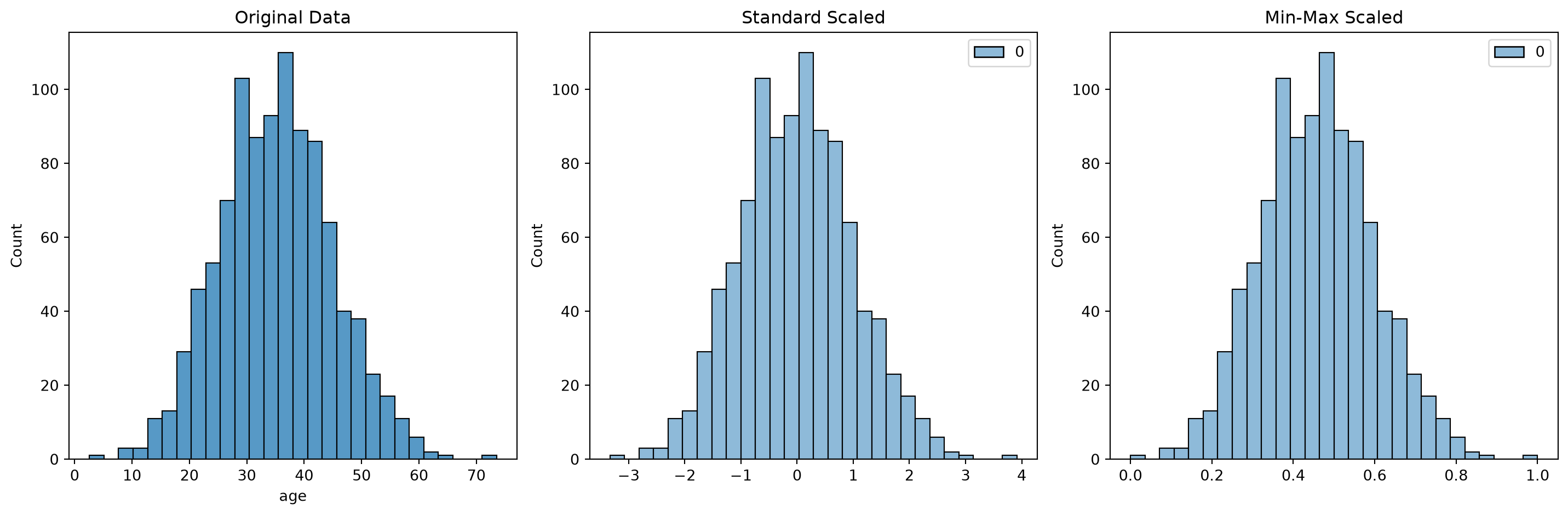
Let's compare different scaling methods:
```{python}
#| code-fold: true
#| code-summary: "Show/hide scaling comparison code"
def compare_scaling_methods(data):
    # Original data
    original = data['age'].copy()

    # Standard scaling
    scaler = StandardScaler()
    standard_scaled = scaler.fit_transform(original.values.reshape(-1, 1))

    # Min-max scaling
    min_max_scaler = MinMaxScaler()
    minmax_scaled = min_max_scaler.fit_transform(original.values.reshape(-1, 1))

    # Plotting
    fig, axes = plt.subplots(1, 3, figsize=(15, 5))

    # Original distribution
    sns.histplot(original, ax=axes[0])
    axes[0].set_title('Original Data')

    # Standard scaled
    sns.histplot(standard_scaled, ax=axes[1])
    axes[1].set_title('Standard Scaled')

    # Min-max scaled
    sns.histplot(minmax_scaled, ax=axes[2])
    axes[2].set_title('Min-Max Scaled')

    plt.tight_layout()
    plt.show()

compare_scaling_methods(df)
```
### 3. Feature Generation
::: {.callout-tip}
## Interactive Feature Generator
Use the code below to experiment with different feature combinations:
:::
```{python}
#| code-fold: true
#| code-summary: "Show/hide feature generation code"
def generate_features(df):
    """Generate new features from existing ones"""
    # Polynomial features
    df['income_squared'] = df['income'] ** 2

    # Interaction features
    df['income_per_education'] = df['income'] / df['education_years']

    # Binning
    df['age_group'] = pd.qcut(df['age'], q=5, labels=['Very Young', 'Young', 'Middle', 'Senior', 'Elder'])

    return df

# Generate new features
df_featured = generate_features(df.copy())

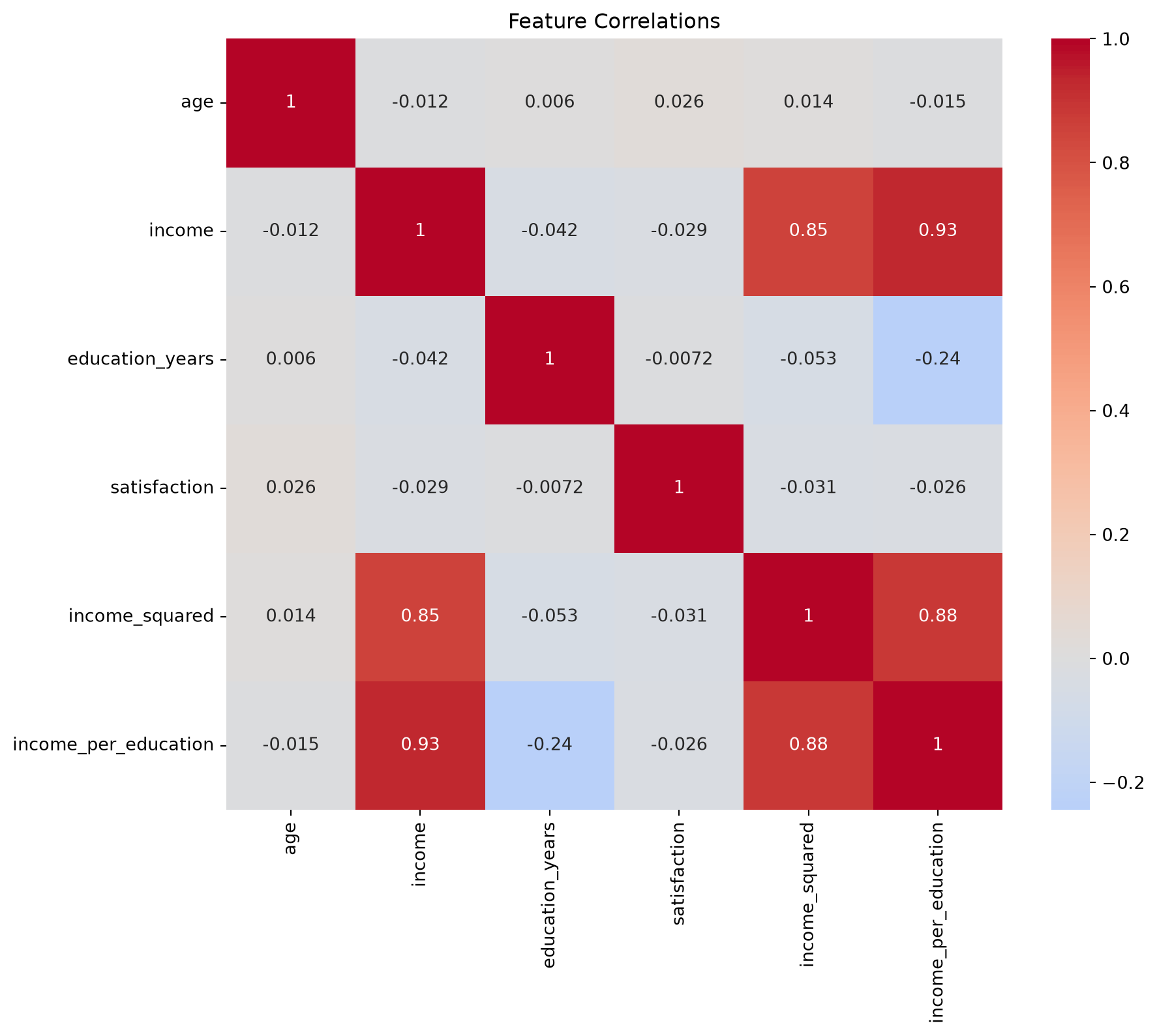
# Show correlations
plt.figure(figsize=(10, 8))
sns.heatmap(df_featured.select_dtypes(include=[np.number]).corr(),
            annot=True, cmap='coolwarm', center=0)
plt.title('Feature Correlations')
plt.show()
```
## Best Practices
::: {.callout-important}
## Key Points to Remember
1. Always scale features **after** splitting into train/test sets
2. Handle missing values before feature generation
3. Document all preprocessing steps for reproducibility
4. Validate generated features with domain experts
:::
## Interactive Feature Selection Tool
```{python}
#| code-fold: true
#| code-summary: "Show/hide feature selection tool"
from sklearn.feature_selection import SelectKBest, f_regression

def plot_feature_importance(X, y, k=5):
    """Plot top k most important features"""
    selector = SelectKBest(score_func=f_regression, k=k)
    selector.fit(X, y)

    # Get feature scores
    scores = pd.DataFrame({
        'Feature': X.columns,
        'Score': selector.scores_
    }).sort_values('Score', ascending=False)

    # Create interactive bar plot
    fig = px.bar(scores, x='Feature', y='Score',
                 title=f'Top {k} Most Important Features',
                 labels={'Score': 'Importance Score'})
    fig.show()

# Example usage
X = df_featured.select_dtypes(include=[np.number]).drop('satisfaction', axis=1)
y = df_featured['satisfaction']
plot_feature_importance(X, y)
```
## Next Steps
Continue to [Part 3: Handling Anonymized Data](https://hasangoni.quarto.pub/hasan-blog-post/posts/data-science-steps-to-follow-part03/) to learn about working with masked and anonymized datasets.
## Related Resources
- [Understanding Matrix Multiplication](/posts/matrix_multiplication_from_fastai_course) - Important for feature transformations
- [Data Science Series Overview](/posts/series/data-science-steps)
## References
1. [Scikit-learn Preprocessing Guide](https://scikit-learn.org/stable/modules/preprocessing.html)
2. [Feature Engineering for Machine Learning](https://www.oreilly.com/library/view/feature-engineering-for/9781491953235/)
3. [Python Data Science Handbook](https://jakevdp.github.io/PythonDataScienceHandbook/)