Why Deep Learning? When Classical Methods Hit the Wall

computer-vision
deep-learning
neural-networks
pytorch
Author

Hasan

Published

January 22, 2025

Modified

August 23, 2026

0.1 The Great Computer Vision Crisis of 2010

Picture this: It’s 2010, and computer vision researchers are frustrated. They’ve spent decades perfecting edge detection, feature matching, and object recognition. Their algorithms can find corners, match keypoints, and even stitch panoramas.

But there’s one problem they can’t solve: telling cats from dogs.

Seriously! While a 3-year-old child could easily distinguish between cats and dogs, the best computer vision systems struggled with this “simple” task. The classical approach required hand-crafting features for every possible variation—different breeds, lighting conditions, poses, backgrounds. It was like trying to write rules for every possible way a cat could look. Impossible!

Then something revolutionary happened…

0.2 The ImageNet Moment: 2012

In 2012, a team led by Alex Krizhevsky entered the ImageNet competition with something called AlexNet—a deep neural network. The results were shocking:

  • Previous best accuracy: 74.3%
  • AlexNet accuracy: 84.7%
  • Improvement: A massive 10+ percentage point jump!

This wasn’t just an incremental improvement—it was a paradigm shift. Deep learning had arrived, and computer vision would never be the same.

0.3 What Makes Deep Learning Different?

Let’s understand why neural networks succeeded where classical methods struggled:

0.3.1 Classical Approach: Hand-Crafted Features

# Classical computer vision pipeline
def classical_cat_detector(image):
    # Step 1: Extract hand-crafted features
    edges = detect_edges(image)
    corners = detect_corners(image)
    textures = analyze_textures(image)
    
    # Step 2: Combine features with rules
    if (pointy_ears and whiskers and fur_texture):
        return "cat"
    else:
        return "not_cat"

Problems: - Features had to be manually designed - Rules were brittle and specific - Couldn’t adapt to new variations - Required domain expertise

0.3.2 Deep Learning Approach: Learned Features

# Deep learning pipeline
def deep_cat_detector(image):
    # The network learns its own features!
    features = neural_network.extract_features(image)
    prediction = neural_network.classify(features)
    return prediction

Advantages: - Features are learned automatically - Adapts to data variations - Improves with more data - Works across different domains

0.4 Your First Neural Network

Let’s build a simple neural network to understand the magic:

Code
import torch
import torch.nn as nn
import torch.optim as optim
import torchvision
import torchvision.transforms as transforms
import matplotlib.pyplot as plt
import numpy as np

# Simple neural network for image classification
class SimpleNet(nn.Module):
    def __init__(self, num_classes=2):  # 2 classes: cat vs dog
        super(SimpleNet, self).__init__()
        
        # Flatten 224x224x3 image to 150,528 features
        self.flatten = nn.Flatten()
        
        # Simple fully connected layers
        self.fc1 = nn.Linear(224 * 224 * 3, 512)
        self.relu1 = nn.ReLU()
        self.dropout1 = nn.Dropout(0.5)
        
        self.fc2 = nn.Linear(512, 128)
        self.relu2 = nn.ReLU()
        self.dropout2 = nn.Dropout(0.5)
        
        self.fc3 = nn.Linear(128, num_classes)
    
    def forward(self, x):
        x = self.flatten(x)
        x = self.dropout1(self.relu1(self.fc1(x)))
        x = self.dropout2(self.relu2(self.fc2(x)))
        x = self.fc3(x)
        return x

# Create the network
simple_net = SimpleNet(num_classes=2)
print("Simple Neural Network:")
print(simple_net)

# Count parameters
total_params = sum(p.numel() for p in simple_net.parameters())
print(f"\nTotal parameters: {total_params:,}")
Simple Neural Network:
SimpleNet(
  (flatten): Flatten(start_dim=1, end_dim=-1)
  (fc1): Linear(in_features=150528, out_features=512, bias=True)
  (relu1): ReLU()
  (dropout1): Dropout(p=0.5, inplace=False)
  (fc2): Linear(in_features=512, out_features=128, bias=True)
  (relu2): ReLU()
  (dropout2): Dropout(p=0.5, inplace=False)
  (fc3): Linear(in_features=128, out_features=2, bias=True)
)

Total parameters: 77,136,770

🎯 Try it yourself! Open in Colab

0.5 The Convolutional Revolution

But wait—there’s a problem with our simple network. It treats each pixel independently, ignoring spatial relationships. That’s like reading a book by looking at each letter separately!

Enter Convolutional Neural Networks (CNNs)—networks designed specifically for images:

Code
class ConvNet(nn.Module):
    def __init__(self, num_classes=2):
        super(ConvNet, self).__init__()
        
        # Convolutional layers (feature extractors)
        self.conv1 = nn.Conv2d(3, 32, kernel_size=3, padding=1)
        self.conv2 = nn.Conv2d(32, 64, kernel_size=3, padding=1)
        self.conv3 = nn.Conv2d(64, 128, kernel_size=3, padding=1)
        
        # Pooling layers (downsampling)
        self.pool = nn.MaxPool2d(2, 2)
        
        # Fully connected layers (classifier)
        self.fc1 = nn.Linear(128 * 28 * 28, 512)  # 224/8 = 28 after 3 pooling layers
        self.fc2 = nn.Linear(512, num_classes)
        
        # Activation and regularization
        self.relu = nn.ReLU()
        self.dropout = nn.Dropout(0.5)
    
    def forward(self, x):
        # Feature extraction
        x = self.pool(self.relu(self.conv1(x)))  # 224x224 -> 112x112
        x = self.pool(self.relu(self.conv2(x)))  # 112x112 -> 56x56
        x = self.pool(self.relu(self.conv3(x)))  # 56x56 -> 28x28
        
        # Flatten and classify
        x = x.view(x.size(0), -1)  # Flatten
        x = self.dropout(self.relu(self.fc1(x)))
        x = self.fc2(x)
        
        return x

# Create CNN
cnn = ConvNet(num_classes=2)
print("Convolutional Neural Network:")
print(cnn)

# Count parameters
cnn_params = sum(p.numel() for p in cnn.parameters())
print(f"\nCNN parameters: {cnn_params:,}")
print(f"Simple net parameters: {total_params:,}")
print(f"CNN has {(total_params - cnn_params) / total_params * 100:.1f}% fewer parameters!")
Convolutional Neural Network:
ConvNet(
  (conv1): Conv2d(3, 32, kernel_size=(3, 3), stride=(1, 1), padding=(1, 1))
  (conv2): Conv2d(32, 64, kernel_size=(3, 3), stride=(1, 1), padding=(1, 1))
  (conv3): Conv2d(64, 128, kernel_size=(3, 3), stride=(1, 1), padding=(1, 1))
  (pool): MaxPool2d(kernel_size=2, stride=2, padding=0, dilation=1, ceil_mode=False)
  (fc1): Linear(in_features=100352, out_features=512, bias=True)
  (fc2): Linear(in_features=512, out_features=2, bias=True)
  (relu): ReLU()
  (dropout): Dropout(p=0.5, inplace=False)
)

CNN parameters: 51,475,010
Simple net parameters: 77,136,770
CNN has 33.3% fewer parameters!

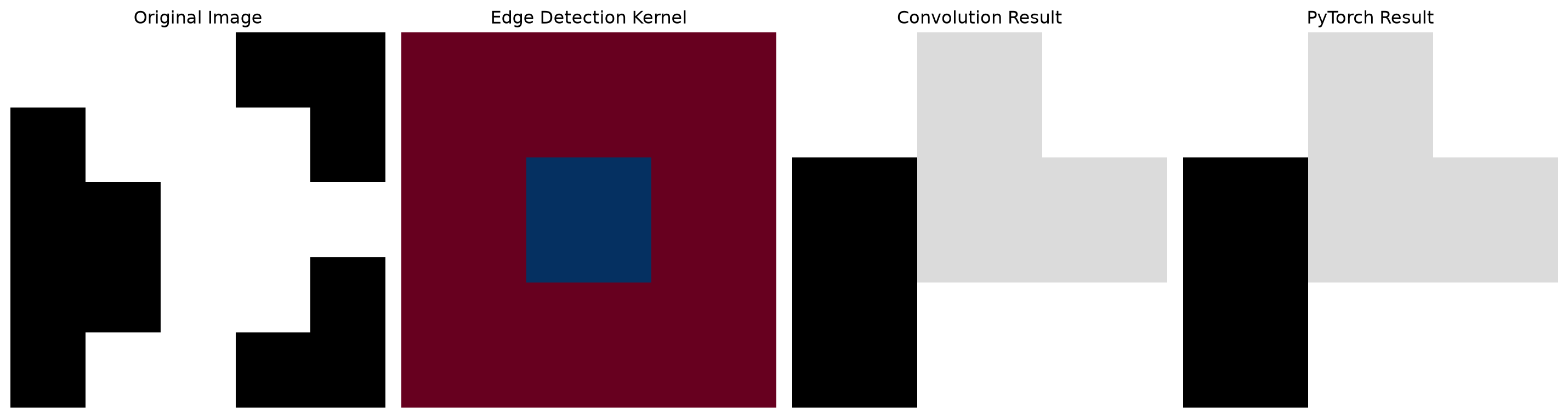
0.6 Understanding Convolutions: The Sliding Window

Let’s visualize what convolutions actually do:

Code
def visualize_convolution():
    """Show how convolution works"""
    # Create a simple image
    image = np.array([
        [1, 1, 1, 0, 0],
        [0, 1, 1, 1, 0],
        [0, 0, 1, 1, 1],
        [0, 0, 1, 1, 0],
        [0, 1, 1, 0, 0]
    ])
    
    # Edge detection kernel
    kernel = np.array([
        [-1, -1, -1],
        [-1,  8, -1],
        [-1, -1, -1]
    ])
    
    # Apply convolution manually
    result = np.zeros((3, 3))
    
    plt.figure(figsize=(15, 5))
    
    # Show original image
    plt.subplot(1, 4, 1)
    plt.imshow(image, cmap='gray')
    plt.title("Original Image")
    plt.axis('off')
    
    # Show kernel
    plt.subplot(1, 4, 2)
    plt.imshow(kernel, cmap='RdBu')
    plt.title("Edge Detection Kernel")
    plt.axis('off')
    
    # Show convolution process
    for i in range(3):
        for j in range(3):
            patch = image[i:i+3, j:j+3]
            result[i, j] = np.sum(patch * kernel)
    
    plt.subplot(1, 4, 3)
    plt.imshow(result, cmap='gray')
    plt.title("Convolution Result")
    plt.axis('off')
    
    # Show using PyTorch
    image_tensor = torch.FloatTensor(image).unsqueeze(0).unsqueeze(0)
    kernel_tensor = torch.FloatTensor(kernel).unsqueeze(0).unsqueeze(0)
    
    conv_layer = nn.Conv2d(1, 1, 3, bias=False)
    conv_layer.weight.data = kernel_tensor
    
    pytorch_result = conv_layer(image_tensor).squeeze().detach().numpy()
    
    plt.subplot(1, 4, 4)
    plt.imshow(pytorch_result, cmap='gray')
    plt.title("PyTorch Result")
    plt.axis('off')
    
    plt.tight_layout()
    plt.show()

visualize_convolution()

0.7 Transfer Learning: Standing on Giants’ Shoulders

Here’s the secret that makes deep learning practical: Transfer Learning. Instead of training from scratch, we use pre-trained models and adapt them to our needs:

Code
import torchvision.models as models

# Load a pre-trained ResNet model
pretrained_model = models.resnet18(pretrained=True)
print("Pre-trained ResNet-18:")
print(pretrained_model)

# Modify for our task (cat vs dog classification)
num_classes = 2
pretrained_model.fc = nn.Linear(pretrained_model.fc.in_features, num_classes)

print(f"\nModified final layer for {num_classes} classes")
print(f"Final layer: {pretrained_model.fc}")

# Freeze early layers (optional)
for param in pretrained_model.parameters():
    param.requires_grad = False

# Only train the final layer
for param in pretrained_model.fc.parameters():
    param.requires_grad = True

trainable_params = sum(p.numel() for p in pretrained_model.parameters() if p.requires_grad)
total_params = sum(p.numel() for p in pretrained_model.parameters())

print(f"\nTrainable parameters: {trainable_params:,}")
print(f"Total parameters: {total_params:,}")
print(f"Training only {trainable_params/total_params*100:.1f}% of parameters!")
Pre-trained ResNet-18:
ResNet(
  (conv1): Conv2d(3, 64, kernel_size=(7, 7), stride=(2, 2), padding=(3, 3), bias=False)
  (bn1): BatchNorm2d(64, eps=1e-05, momentum=0.1, affine=True, bias=True, track_running_stats=True)
  (relu): ReLU(inplace=True)
  (maxpool): MaxPool2d(kernel_size=3, stride=2, padding=1, dilation=1, ceil_mode=False)
  (layer1): Sequential(
    (0): BasicBlock(
      (conv1): Conv2d(64, 64, kernel_size=(3, 3), stride=(1, 1), padding=(1, 1), bias=False)
      (bn1): BatchNorm2d(64, eps=1e-05, momentum=0.1, affine=True, bias=True, track_running_stats=True)
      (relu): ReLU(inplace=True)
      (conv2): Conv2d(64, 64, kernel_size=(3, 3), stride=(1, 1), padding=(1, 1), bias=False)
      (bn2): BatchNorm2d(64, eps=1e-05, momentum=0.1, affine=True, bias=True, track_running_stats=True)
    )
    (1): BasicBlock(
      (conv1): Conv2d(64, 64, kernel_size=(3, 3), stride=(1, 1), padding=(1, 1), bias=False)
      (bn1): BatchNorm2d(64, eps=1e-05, momentum=0.1, affine=True, bias=True, track_running_stats=True)
      (relu): ReLU(inplace=True)
      (conv2): Conv2d(64, 64, kernel_size=(3, 3), stride=(1, 1), padding=(1, 1), bias=False)
      (bn2): BatchNorm2d(64, eps=1e-05, momentum=0.1, affine=True, bias=True, track_running_stats=True)
    )
  )
  (layer2): Sequential(
    (0): BasicBlock(
      (conv1): Conv2d(64, 128, kernel_size=(3, 3), stride=(2, 2), padding=(1, 1), bias=False)
      (bn1): BatchNorm2d(128, eps=1e-05, momentum=0.1, affine=True, bias=True, track_running_stats=True)
      (relu): ReLU(inplace=True)
      (conv2): Conv2d(128, 128, kernel_size=(3, 3), stride=(1, 1), padding=(1, 1), bias=False)
      (bn2): BatchNorm2d(128, eps=1e-05, momentum=0.1, affine=True, bias=True, track_running_stats=True)
      (downsample): Sequential(
        (0): Conv2d(64, 128, kernel_size=(1, 1), stride=(2, 2), bias=False)
        (1): BatchNorm2d(128, eps=1e-05, momentum=0.1, affine=True, bias=True, track_running_stats=True)
      )
    )
    (1): BasicBlock(
      (conv1): Conv2d(128, 128, kernel_size=(3, 3), stride=(1, 1), padding=(1, 1), bias=False)
      (bn1): BatchNorm2d(128, eps=1e-05, momentum=0.1, affine=True, bias=True, track_running_stats=True)
      (relu): ReLU(inplace=True)
      (conv2): Conv2d(128, 128, kernel_size=(3, 3), stride=(1, 1), padding=(1, 1), bias=False)
      (bn2): BatchNorm2d(128, eps=1e-05, momentum=0.1, affine=True, bias=True, track_running_stats=True)
    )
  )
  (layer3): Sequential(
    (0): BasicBlock(
      (conv1): Conv2d(128, 256, kernel_size=(3, 3), stride=(2, 2), padding=(1, 1), bias=False)
      (bn1): BatchNorm2d(256, eps=1e-05, momentum=0.1, affine=True, bias=True, track_running_stats=True)
      (relu): ReLU(inplace=True)
      (conv2): Conv2d(256, 256, kernel_size=(3, 3), stride=(1, 1), padding=(1, 1), bias=False)
      (bn2): BatchNorm2d(256, eps=1e-05, momentum=0.1, affine=True, bias=True, track_running_stats=True)
      (downsample): Sequential(
        (0): Conv2d(128, 256, kernel_size=(1, 1), stride=(2, 2), bias=False)
        (1): BatchNorm2d(256, eps=1e-05, momentum=0.1, affine=True, bias=True, track_running_stats=True)
      )
    )
    (1): BasicBlock(
      (conv1): Conv2d(256, 256, kernel_size=(3, 3), stride=(1, 1), padding=(1, 1), bias=False)
      (bn1): BatchNorm2d(256, eps=1e-05, momentum=0.1, affine=True, bias=True, track_running_stats=True)
      (relu): ReLU(inplace=True)
      (conv2): Conv2d(256, 256, kernel_size=(3, 3), stride=(1, 1), padding=(1, 1), bias=False)
      (bn2): BatchNorm2d(256, eps=1e-05, momentum=0.1, affine=True, bias=True, track_running_stats=True)
    )
  )
  (layer4): Sequential(
    (0): BasicBlock(
      (conv1): Conv2d(256, 512, kernel_size=(3, 3), stride=(2, 2), padding=(1, 1), bias=False)
      (bn1): BatchNorm2d(512, eps=1e-05, momentum=0.1, affine=True, bias=True, track_running_stats=True)
      (relu): ReLU(inplace=True)
      (conv2): Conv2d(512, 512, kernel_size=(3, 3), stride=(1, 1), padding=(1, 1), bias=False)
      (bn2): BatchNorm2d(512, eps=1e-05, momentum=0.1, affine=True, bias=True, track_running_stats=True)
      (downsample): Sequential(
        (0): Conv2d(256, 512, kernel_size=(1, 1), stride=(2, 2), bias=False)
        (1): BatchNorm2d(512, eps=1e-05, momentum=0.1, affine=True, bias=True, track_running_stats=True)
      )
    )
    (1): BasicBlock(
      (conv1): Conv2d(512, 512, kernel_size=(3, 3), stride=(1, 1), padding=(1, 1), bias=False)
      (bn1): BatchNorm2d(512, eps=1e-05, momentum=0.1, affine=True, bias=True, track_running_stats=True)
      (relu): ReLU(inplace=True)
      (conv2): Conv2d(512, 512, kernel_size=(3, 3), stride=(1, 1), padding=(1, 1), bias=False)
      (bn2): BatchNorm2d(512, eps=1e-05, momentum=0.1, affine=True, bias=True, track_running_stats=True)
    )
  )
  (avgpool): AdaptiveAvgPool2d(output_size=(1, 1))
  (fc): Linear(in_features=512, out_features=1000, bias=True)
)

Modified final layer for 2 classes
Final layer: Linear(in_features=512, out_features=2, bias=True)

Trainable parameters: 1,026
Total parameters: 11,177,538
Training only 0.0% of parameters!
0.8 Your First Image Classifier

Let’s build a complete image classification system:

Code
class ImageClassifier:
    def __init__(self, model_name='resnet18', num_classes=2):
        self.device = torch.device('cuda' if torch.cuda.is_available() else 'cpu')
        print(f"Using device: {self.device}")
        
        # Load pre-trained model
        if model_name == 'resnet18':
            self.model = models.resnet18(pretrained=True)
            self.model.fc = nn.Linear(self.model.fc.in_features, num_classes)
        
        self.model = self.model.to(self.device)
        
        # Define transforms
        self.transform = transforms.Compose([
            transforms.Resize((224, 224)),
            transforms.ToTensor(),
            transforms.Normalize(mean=[0.485, 0.456, 0.406], 
                               std=[0.229, 0.224, 0.225])
        ])
        
        self.classes = ['cat', 'dog']  # Update based on your classes
    
    def predict(self, image):
        """Predict class of a single image"""
        self.model.eval()
        
        # Preprocess image
        if isinstance(image, np.ndarray):
            from PIL import Image
            image = Image.fromarray(image)
        
        input_tensor = self.transform(image).unsqueeze(0).to(self.device)
        
        # Make prediction
        with torch.no_grad():
            outputs = self.model(input_tensor)
            probabilities = torch.softmax(outputs, dim=1)
            predicted_class = torch.argmax(probabilities, dim=1).item()
            confidence = probabilities[0][predicted_class].item()
        
        return {
            'class': self.classes[predicted_class],
            'confidence': confidence,
            'probabilities': probabilities.cpu().numpy()[0]
        }
    
    def predict_batch(self, images):
        """Predict classes for multiple images"""
        results = []
        for image in images:
            result = self.predict(image)
            results.append(result)
        return results

# Create classifier
classifier = ImageClassifier()

# Test with a sample image (you would load your own)
def test_classifier(image_path):
    from PIL import Image
    
    # Load image
    image = Image.open(image_path)
    
    # Make prediction
    result = classifier.predict(image)
    
    # Display result
    plt.figure(figsize=(10, 6))
    
    plt.subplot(1, 2, 1)
    plt.imshow(image)
    plt.title(f"Input Image")
    plt.axis('off')
    
    plt.subplot(1, 2, 2)
    plt.bar(classifier.classes, result['probabilities'])
    plt.title(f"Prediction: {result['class']} ({result['confidence']:.2f})")
    plt.ylabel("Probability")
    
    plt.tight_layout()
    plt.show()
    
    return result

# Test the classifier
# result = test_classifier('your_image.jpg')
Using device: cuda

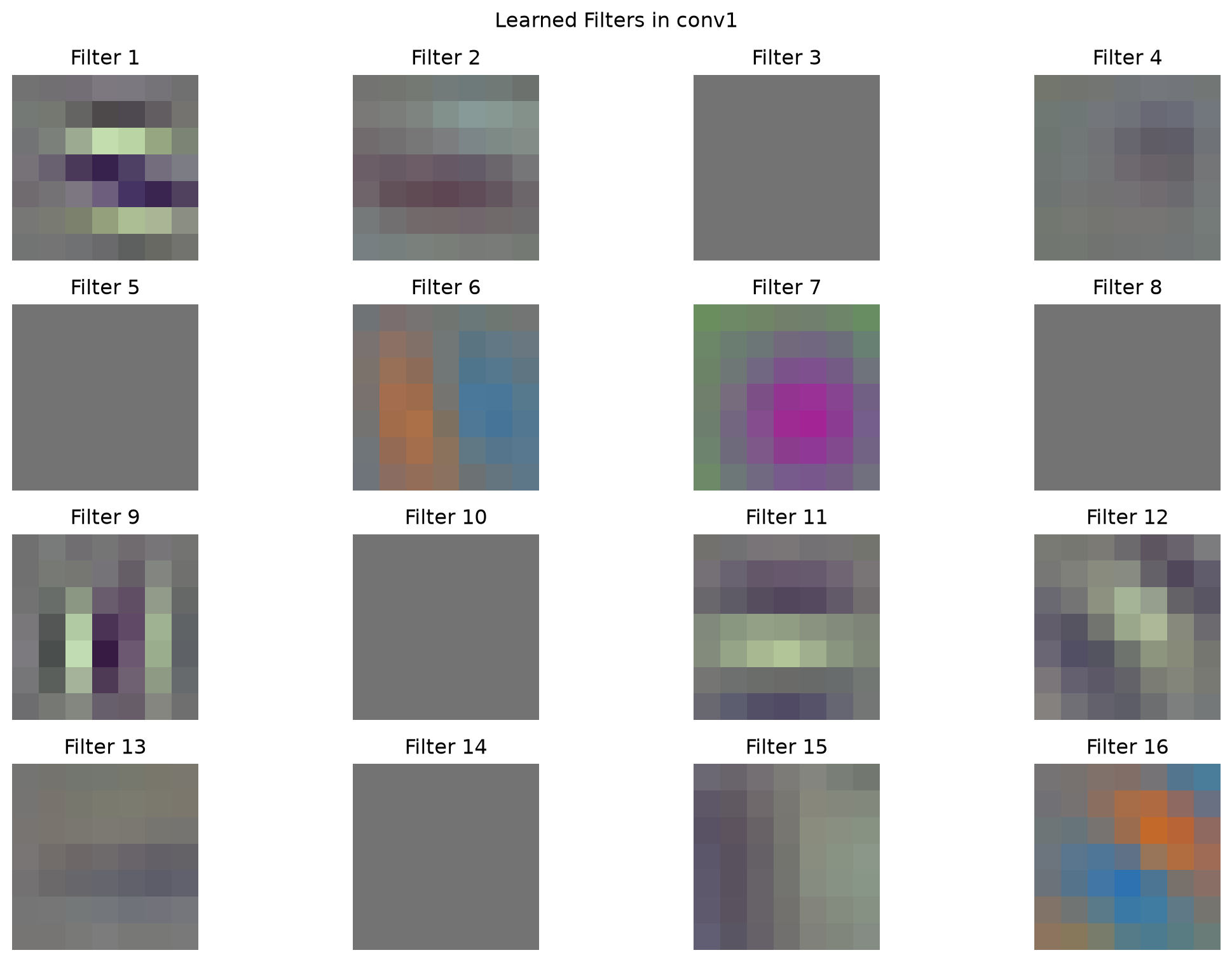
0.9 Visualizing What Neural Networks Learn

One of the coolest things about deep learning is visualizing what the network actually learns:

Code
def visualize_filters(model, layer_name='conv1'):
    """Visualize the filters learned by a convolutional layer"""
    
    # Get the layer
    layer = dict(model.named_modules())[layer_name]
    
    # Get the weights
    weights = layer.weight.data.cpu()
    
    # Normalize weights for visualization
    weights = (weights - weights.min()) / (weights.max() - weights.min())
    
    # Plot filters
    num_filters = min(16, weights.shape[0])  # Show first 16 filters
    
    plt.figure(figsize=(12, 8))
    
    for i in range(num_filters):
        plt.subplot(4, 4, i + 1)
        
        if weights.shape[1] == 3:  # RGB filters
            # Transpose from (C, H, W) to (H, W, C)
            filter_img = weights[i].permute(1, 2, 0)
            plt.imshow(filter_img)
        else:  # Grayscale filters
            plt.imshow(weights[i, 0], cmap='gray')
        
        plt.title(f"Filter {i+1}")
        plt.axis('off')
    
    plt.suptitle(f"Learned Filters in {layer_name}")
    plt.tight_layout()
    plt.show()

# Visualize filters from our pre-trained model
visualize_filters(pretrained_model, 'conv1')

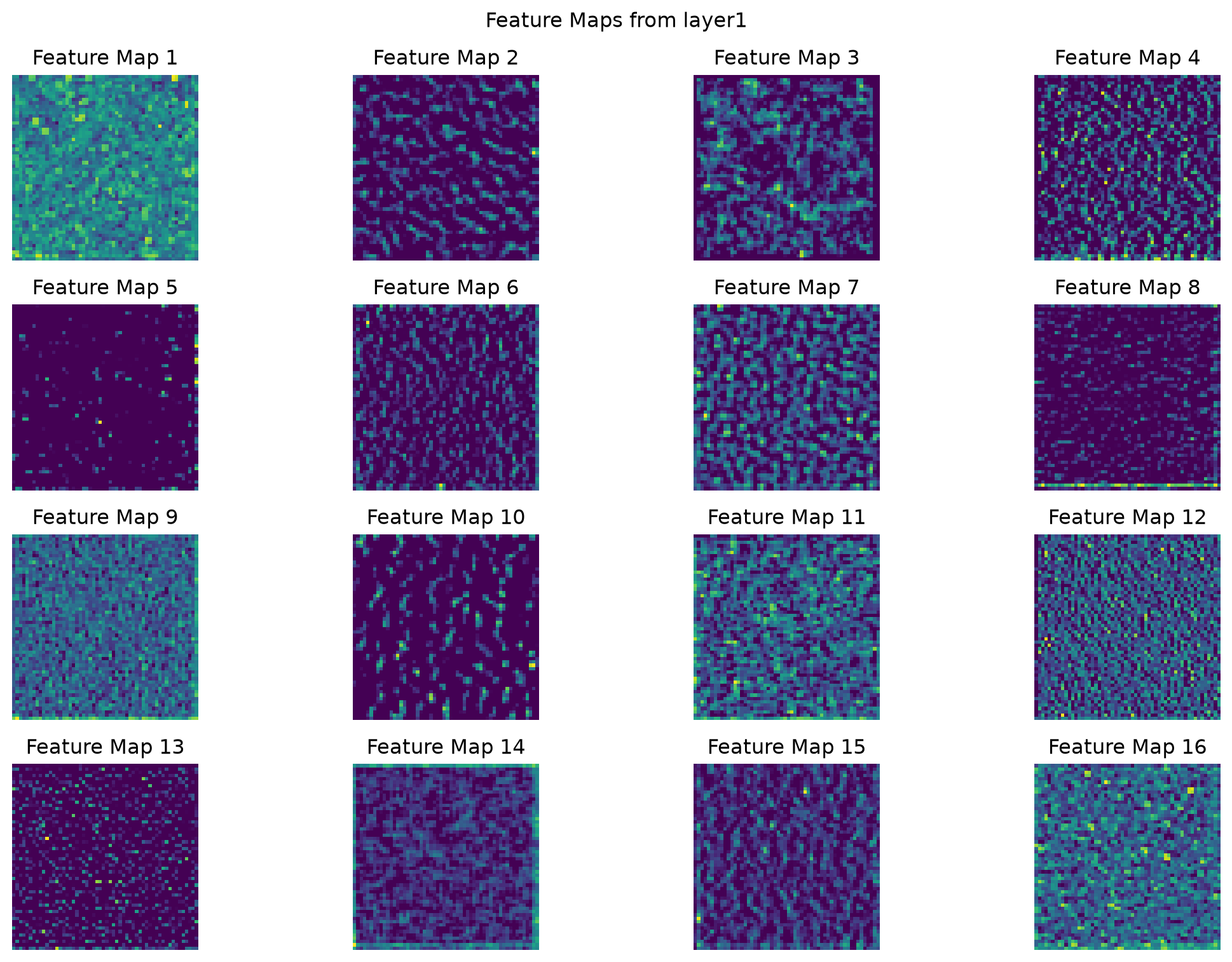
0.10 Feature Maps: Seeing Through the Network’s Eyes

Code
def visualize_feature_maps(model, image, layer_name='layer1'):
    """Visualize feature maps from a specific layer"""
    
    # Hook to capture feature maps
    feature_maps = []
    
    def hook_fn(module, input, output):
        feature_maps.append(output.cpu())
    
    # Register hook
    layer = dict(model.named_modules())[layer_name]
    hook = layer.register_forward_hook(hook_fn)
    
    # Forward pass
    model.eval()
    with torch.no_grad():
        _ = model(image.unsqueeze(0))
    
    # Remove hook
    hook.remove()
    
    # Get feature maps
    fmaps = feature_maps[0].squeeze(0)  # Remove batch dimension
    
    # Plot feature maps
    num_maps = min(16, fmaps.shape[0])
    
    plt.figure(figsize=(12, 8))
    
    for i in range(num_maps):
        plt.subplot(4, 4, i + 1)
        plt.imshow(fmaps[i], cmap='viridis')
        plt.title(f"Feature Map {i+1}")
        plt.axis('off')
    
    plt.suptitle(f"Feature Maps from {layer_name}")
    plt.tight_layout()
    plt.show()

# Create a sample input
sample_input = torch.randn(3, 224, 224)
visualize_feature_maps(pretrained_model, sample_input)

0.11 The Deep Learning Advantage: Why It Works

Let’s compare classical vs deep learning approaches on a real problem:

Code
def compare_approaches(image):
    """Compare classical and deep learning approaches"""
    
    plt.figure(figsize=(15, 10))
    
    # Original image
    plt.subplot(2, 3, 1)
    plt.imshow(image)
    plt.title("Original Image")
    plt.axis('off')
    
    # Classical approach: hand-crafted features
    gray = cv2.cvtColor(image, cv2.COLOR_RGB2GRAY)
    
    # Edge features
    edges = cv2.Canny(gray, 50, 150)
    plt.subplot(2, 3, 2)
    plt.imshow(edges, cmap='gray')
    plt.title("Classical: Edge Features")
    plt.axis('off')
    
    # Texture features (using LBP-like approach)
    from skimage.feature import local_binary_pattern
    lbp = local_binary_pattern(gray, 24, 8, method='uniform')
    plt.subplot(2, 3, 3)
    plt.imshow(lbp, cmap='gray')
    plt.title("Classical: Texture Features")
    plt.axis('off')
    
    # Deep learning approach: learned features
    # Transform image for the model
    transform = transforms.Compose([
        transforms.ToPILImage(),
        transforms.Resize((224, 224)),
        transforms.ToTensor(),
        transforms.Normalize(mean=[0.485, 0.456, 0.406], 
                           std=[0.229, 0.224, 0.225])
    ])
    
    input_tensor = transform(image).unsqueeze(0)
    
    # Get feature maps from different layers
    feature_maps = []
    
    def get_features(name):
        def hook(model, input, output):
            feature_maps.append((name, output.cpu()))
        return hook
    
    # Register hooks
    pretrained_model.layer1.register_forward_hook(get_features('Low-level'))
    pretrained_model.layer3.register_forward_hook(get_features('Mid-level'))
    pretrained_model.layer4.register_forward_hook(get_features('High-level'))
    
    # Forward pass
    pretrained_model.eval()
    with torch.no_grad():
        _ = pretrained_model(input_tensor)
    
    # Visualize learned features
    for i, (name, fmaps) in enumerate(feature_maps):
        plt.subplot(2, 3, 4 + i)
        # Average across channels for visualization
        avg_fmap = torch.mean(fmaps.squeeze(0), dim=0)
        plt.imshow(avg_fmap, cmap='viridis')
        plt.title(f"Deep Learning: {name} Features")
        plt.axis('off')
    
    plt.tight_layout()
    plt.show()

# Compare approaches (you would use your own image)
# compare_approaches(your_image)

0.12 Why Deep Learning Won

Here’s why deep learning revolutionized computer vision:

0.12.1 1. Automatic Feature Learning

  • No need to hand-craft features
  • Learns optimal representations for the task
  • Adapts to data variations

0.12.2 2. Hierarchical Representations

  • Low-level features (edges, textures)
  • Mid-level features (parts, patterns)
  • High-level features (objects, concepts)

0.12.3 3. End-to-End Learning

  • Optimizes entire pipeline together
  • Features and classifier learned jointly
  • Better overall performance

0.12.4 4. Scalability

  • Performance improves with more data
  • Can handle complex, real-world variations
  • Generalizes across domains

0.13 The Modern Deep Learning Pipeline

Code
class ModernVisionPipeline:
    def __init__(self):
        self.device = torch.device('cuda' if torch.cuda.is_available() else 'cpu')
        
        # 1. Data preprocessing
        self.transform = transforms.Compose([
            transforms.Resize((224, 224)),
            transforms.RandomHorizontalFlip(p=0.5),  # Data augmentation
            transforms.RandomRotation(10),
            transforms.ColorJitter(brightness=0.2, contrast=0.2),
            transforms.ToTensor(),
            transforms.Normalize(mean=[0.485, 0.456, 0.406], 
                               std=[0.229, 0.224, 0.225])
        ])
        
        # 2. Model architecture
        self.model = models.resnet50(pretrained=True)
        
        # 3. Transfer learning setup
        # Freeze early layers
        for param in list(self.model.parameters())[:-10]:
            param.requires_grad = False
        
        # 4. Optimizer and loss
        self.optimizer = optim.Adam(
            filter(lambda p: p.requires_grad, self.model.parameters()),
            lr=0.001
        )
        self.criterion = nn.CrossEntropyLoss()
    
    def train_step(self, images, labels):
        """Single training step"""
        self.model.train()
        
        # Forward pass
        outputs = self.model(images)
        loss = self.criterion(outputs, labels)
        
        # Backward pass
        self.optimizer.zero_grad()
        loss.backward()
        self.optimizer.step()
        
        return loss.item()
    
    def evaluate(self, images, labels):
        """Evaluation step"""
        self.model.eval()
        
        with torch.no_grad():
            outputs = self.model(images)
            _, predicted = torch.max(outputs, 1)
            accuracy = (predicted == labels).float().mean()
        
        return accuracy.item()

# Create modern pipeline
pipeline = ModernVisionPipeline()
print("Modern deep learning pipeline ready!")
Modern deep learning pipeline ready!

0.14 What’s Coming Next?

In our next post, “Modern Vision Models: CNNs, Vision Transformers, and DINOv2”, we’ll explore:

  • State-of-the-art architectures (ResNet, EfficientNet, Vision Transformers)
  • Foundation models like DINOv2
  • Self-supervised learning (learning without labels)
  • Building your own DINOv2 feature extractor

You’ve just learned why deep learning revolutionized computer vision—next, we’ll explore the cutting-edge models that are shaping the future!

0.15 Key Takeaways

  • Classical methods hit a wall with complex real-world variations
  • Deep learning learns features automatically instead of hand-crafting them
  • CNNs are designed for images with spatial understanding
  • Transfer learning makes deep learning practical for everyone
  • Hierarchical features enable understanding at multiple levels
  • Modern pipelines combine data augmentation, pre-training, and fine-tuning
TipHands-On Lab

Ready to build your first deep learning classifier? Try the complete interactive notebook: Deep Learning Basics Lab

Train your own cat vs dog classifier and see the power of neural networks!


You’ve just witnessed the deep learning revolution! From struggling with cat vs dog classification to achieving superhuman performance on complex tasks—this is why deep learning changed everything. Next, we’ll explore the latest and greatest models that are pushing the boundaries even further.

Reuse

Citation

BibTeX citation:
@online{2025,
  author = {, Hasan},
  title = {Why {Deep} {Learning?} {When} {Classical} {Methods} {Hit} the
    {Wall}},
  date = {2025-01-22},
  langid = {en}
}
For attribution, please cite this work as:
Hasan. 2025. “Why Deep Learning? When Classical Methods Hit the Wall.” January 22.
Free email course · 7 days

Industrial Vision Foundations

AI can write the code, but someone still has to know which method fits a real inspection line. One short lesson a day for 7 days on the classical computer vision techniques that still run production systems.

Runnable code in every lesson. No spam, unsubscribe any time.

Questions, corrections or feedback?

Found a mistake, or want a topic covered next? Leave a comment below (sign in with GitHub), or write to hasanme1412@gmail.com. I read everything.