---
title: "Feature Magic: What Makes Images Unique"
author: "Hasan"
date: 2025-01-22
categories: [computer-vision, features, keypoints, matching]
tags: [sift, orb, keypoints, feature-matching, panorama]
image: "images/feature-magic-header.jpg"
toc: true
series:
name: "Computer Vision Foundations"
number: 6
format:
html: default
jupyter: python3
---

## The Puzzle Piece Problem
Imagine you're doing a 1000-piece jigsaw puzzle. How do you know which pieces fit together? You look for **unique features**—distinctive colors, patterns, corners, and edges that help you match pieces.
Computer vision faces the same challenge: How do we find the same object in different photos? The answer lies in **feature detection**—finding unique, recognizable points that remain consistent even when the image changes.
Today, we'll unlock this superpower and teach computers to recognize objects across different photos, lighting conditions, and viewing angles!
:::{.callout-tip}
**Try it yourself!** Open this [interactive Colab notebook](https://colab.research.google.com/github/hasanpasha/quarto_blog_hasan/blob/main/notebooks/cv-foundations-05-feature-magic.ipynb) to experiment with feature detection and matching as we build this tutorial.
:::
## What Are Features?
**Features** are distinctive points in an image that are:
- **Unique**: Stand out from their surroundings
- **Repeatable**: Can be found again in different images
- **Stable**: Don't change much with lighting or viewpoint
- **Informative**: Carry enough information for matching
Think of features as the "fingerprints" of an image!
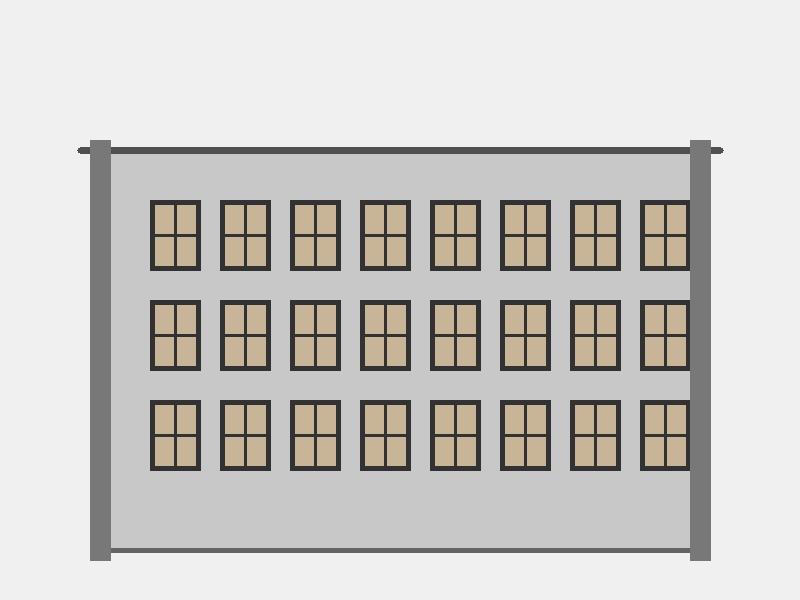
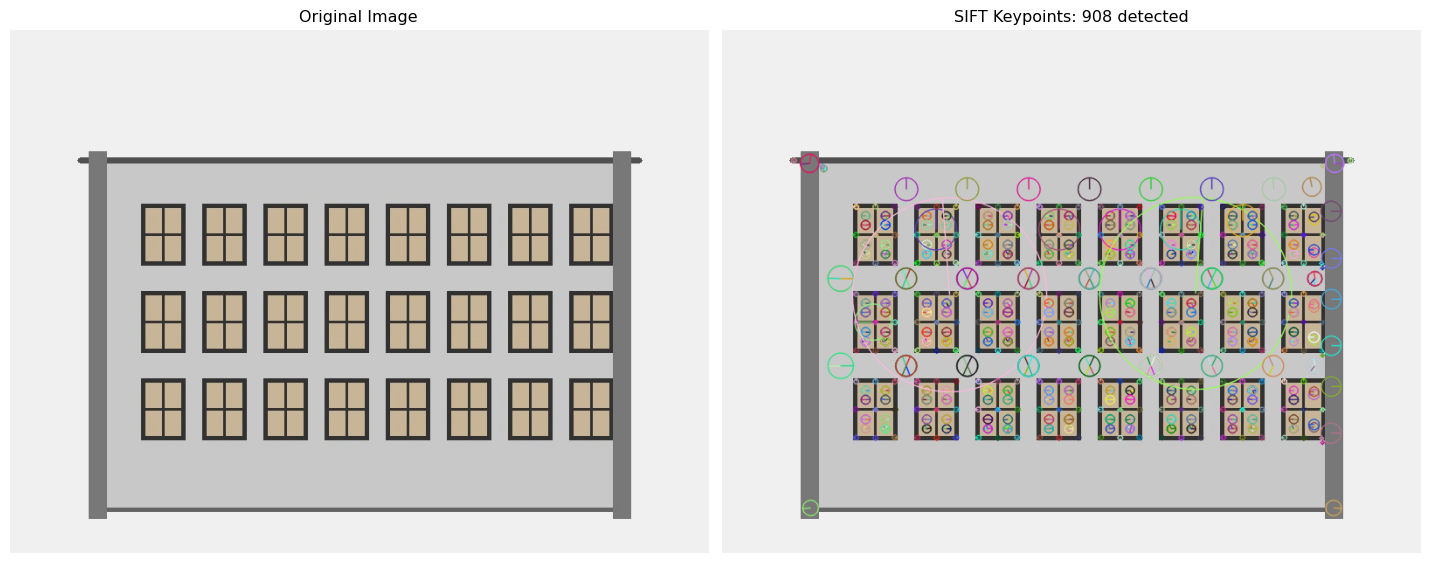
In this architectural image, features would be detected at:
- **Window corners** where frames meet
- **Building edges** and wall boundaries
- **Grid patterns** of repeated windows
- **High-contrast regions** between frames and glass
## Your First Feature Detector: SIFT
**SIFT** (Scale-Invariant Feature Transform) is like having a super-detective that can find the same clues even if they're rotated, scaled, or slightly changed:
```{python}
#| eval: true
import cv2
import numpy as np
import matplotlib.pyplot as plt
import requests
from io import BytesIO
from PIL import Image

# Load a sample image with clear features (architectural scene)
def load_image_from_url(url):
    response = requests.get(url)
    img = Image.open(BytesIO(response.content))
    return cv2.cvtColor(np.array(img), cv2.COLOR_RGB2BGR)

# Load our synthetic architectural image with clear features
img = cv2.imread('images/architecture-features.jpg')
img_rgb = cv2.cvtColor(img, cv2.COLOR_BGR2RGB)
gray = cv2.cvtColor(img, cv2.COLOR_BGR2GRAY)

# Create SIFT detector
sift = cv2.SIFT_create()

# Find keypoints and descriptors
keypoints, descriptors = sift.detectAndCompute(gray, None)

print(f"SIFT found {len(keypoints)} keypoints")
print(f"Each keypoint has a {descriptors.shape[1]}-dimensional descriptor")

# Draw keypoints
img_with_keypoints = cv2.drawKeypoints(
    img_rgb, keypoints, None,
    flags=cv2.DRAW_MATCHES_FLAGS_DRAW_RICH_KEYPOINTS
)

# Display results
plt.figure(figsize=(15, 8))

plt.subplot(1, 2, 1)
plt.imshow(img_rgb)
plt.title("Original Image")
plt.axis('off')

plt.subplot(1, 2, 2)
plt.imshow(img_with_keypoints)
plt.title(f"SIFT Keypoints: {len(keypoints)} detected")
plt.axis('off')

plt.tight_layout()
plt.show()

# Show some keypoint properties
print("\nFirst 5 keypoints properties:")
for i, kp in enumerate(keypoints[:5]):
    print(f"Keypoint {i+1}: position=({kp.pt[0]:.1f}, {kp.pt[1]:.1f}), "
          f"size={kp.size:.1f}, angle={kp.angle:.1f}°")
```
**🎯 Amazing!** Each green circle represents a detected feature. The size shows the scale, and the line shows the orientation.
## The Faster Alternative: ORB
**ORB** (Oriented FAST and Rotated BRIEF) is like SIFT's speedy cousin—faster and free to use in commercial applications:
```{python}
#| eval: true
# Create ORB detector
orb = cv2.ORB_create()

# Find keypoints and descriptors
orb_kp, orb_desc = orb.detectAndCompute(gray, None)

print(f"ORB found {len(orb_kp)} keypoints")
print(f"Each keypoint has a {orb_desc.shape[1]*8}-bit binary descriptor")

# Draw ORB keypoints
img_orb = cv2.drawKeypoints(img_rgb, orb_kp, None, color=(0, 255, 0), flags=0)

# Compare SIFT vs ORB
plt.figure(figsize=(15, 10))

plt.subplot(2, 2, 1)
plt.imshow(img_with_keypoints)
plt.title(f"SIFT: {len(keypoints)} keypoints")
plt.axis('off')

plt.subplot(2, 2, 2)
plt.imshow(img_orb)
plt.title(f"ORB: {len(orb_kp)} keypoints")
plt.axis('off')

# Show descriptor differences
plt.subplot(2, 2, 3)
plt.plot(descriptors[0])
plt.title("SIFT Descriptor (128 values)")
plt.xlabel("Dimension")
plt.ylabel("Value")

plt.subplot(2, 2, 4)
plt.plot(orb_desc[0])
plt.title("ORB Descriptor (32 bytes)")
plt.xlabel("Byte")
plt.ylabel("Value")

plt.tight_layout()
plt.show()
```
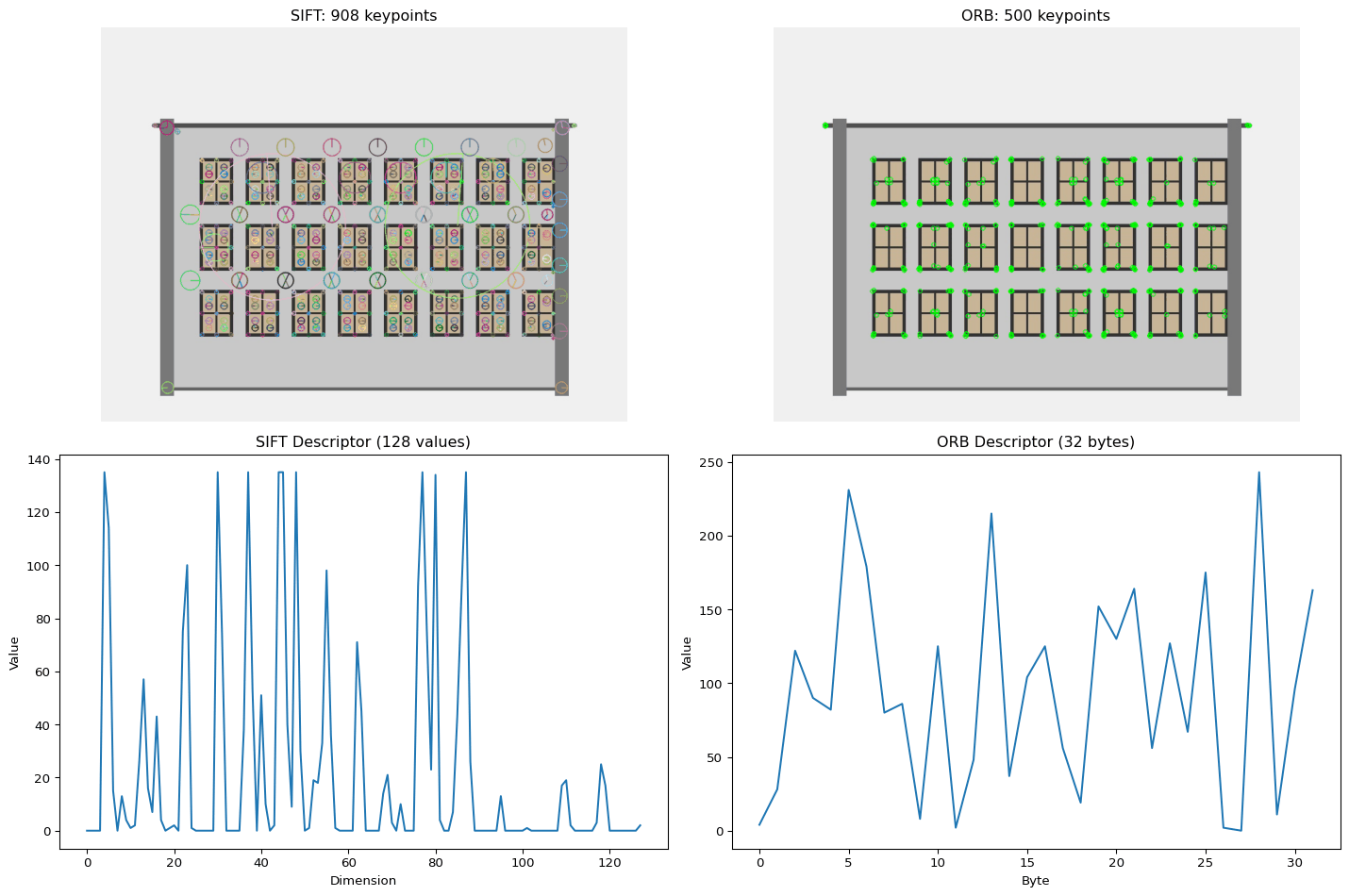
**Key Differences:**
- **SIFT**: More accurate, 128-dimensional float descriptors
- **ORB**: Faster, 256-bit binary descriptors, patent-free
## Feature Matching: Finding Connections
Now comes the exciting part—matching features between images to find the same objects or scenes:
```{python}
#| eval: true
# Load a second image (different architectural pattern for matching)
img2 = cv2.imread('images/architecture-features-2.jpg')
img2_rgb = cv2.cvtColor(img2, cv2.COLOR_BGR2RGB)
gray2 = cv2.cvtColor(img2, cv2.COLOR_BGR2GRAY)

# Detect features in both images
kp1, desc1 = sift.detectAndCompute(gray, None)
kp2, desc2 = sift.detectAndCompute(gray2, None)

def match_features(desc1, desc2, ratio_threshold=0.7):
    """Match features using Lowe's ratio test"""

    # Brute Force matcher
    bf = cv2.BFMatcher()
    matches = bf.knnMatch(desc1, desc2, k=2)

    # Apply Lowe's ratio test to filter good matches
    good_matches = []
    for match_pair in matches:
        if len(match_pair) == 2:
            m, n = match_pair
            if m.distance < ratio_threshold * n.distance:
                good_matches.append(m)

    return good_matches

# Match SIFT features
good_matches = match_features(desc1, desc2)
print(f"Found {len(good_matches)} good matches out of {len(kp1)} and {len(kp2)} keypoints")

# Draw matches
matched_img = cv2.drawMatches(
    img_rgb, kp1,
    img2_rgb, kp2,
    good_matches[:50], None,  # Show top 50 matches
    flags=cv2.DrawMatchesFlags_NOT_DRAW_SINGLE_POINTS
)

plt.figure(figsize=(20, 10))
plt.imshow(matched_img)
plt.title(f"Feature Matching: {len(good_matches)} matches found")
plt.axis('off')
plt.show()

# Show match quality statistics
distances = [m.distance for m in good_matches]
print(f"\nMatch quality statistics:")
print(f"Average distance: {np.mean(distances):.2f}")
#print(f"Min distance: {np.min(distances):.2f}")
#print(f"Max distance: {np.max(distances):.2f}")
```
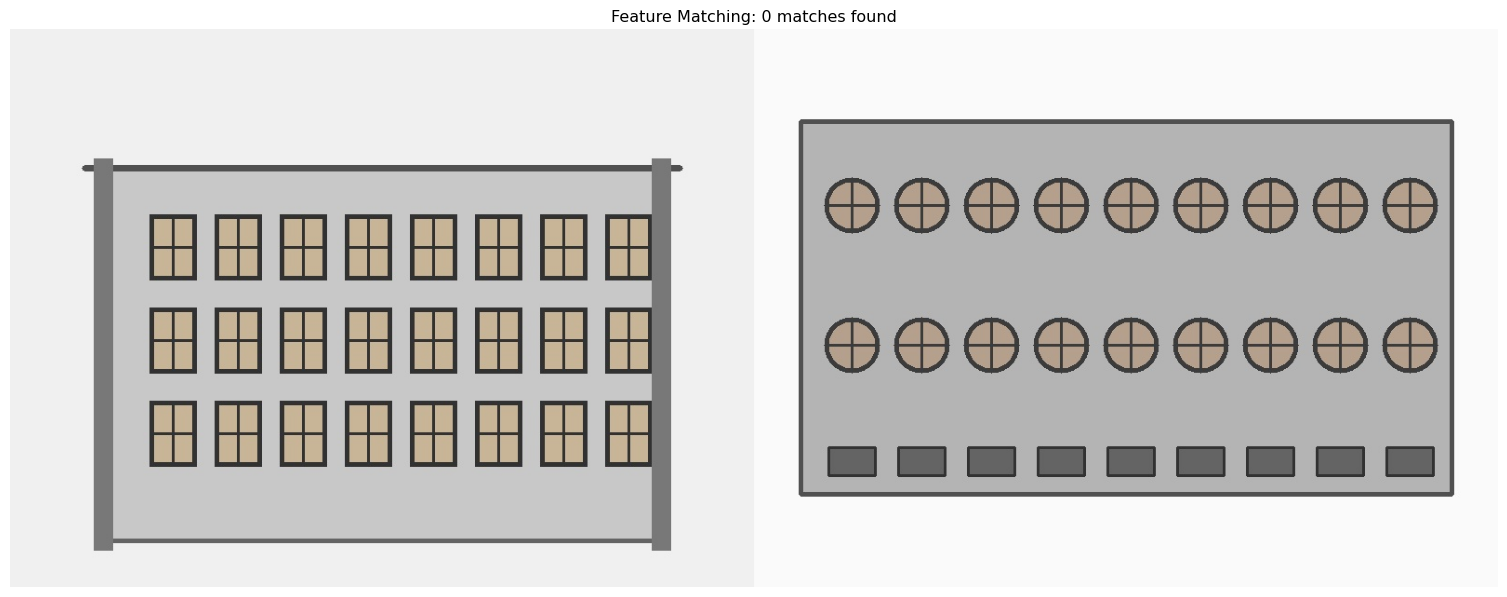
**🔥 Incredible!** Each line connects matching features between the two images. The shorter the line, the better the match!
## Understanding Feature Descriptors
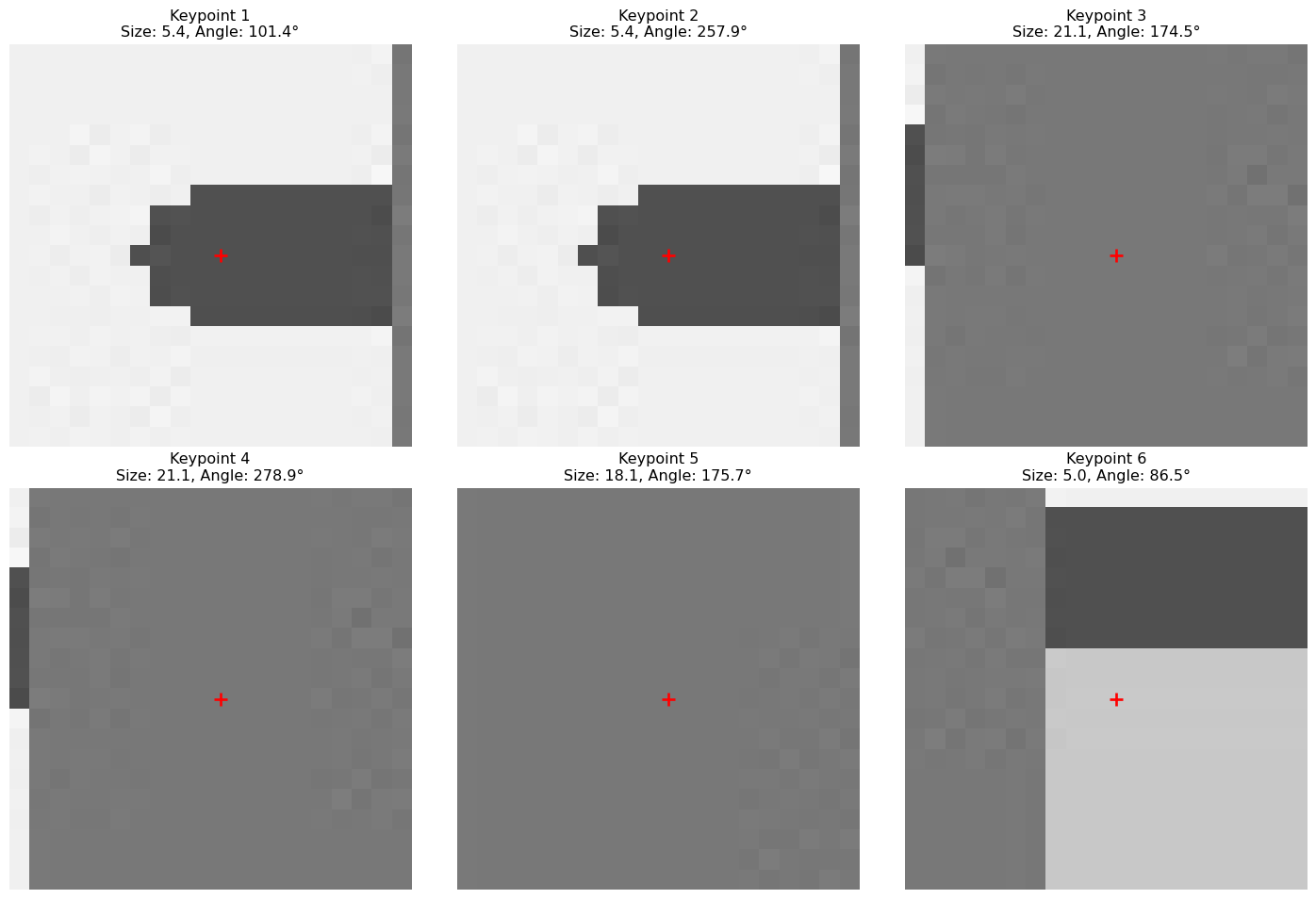
Each keypoint comes with a **descriptor**—a numerical "fingerprint" that describes the local area around that point:
```{python}
#| eval: true
def visualize_feature_patches(image, keypoints, num_features=6):
    """Visualize patches around keypoints"""

    plt.figure(figsize=(15, 10))

    for i in range(min(num_features, len(keypoints))):
        kp = keypoints[i]

        # Extract patch around keypoint
        x, y = int(kp.pt[0]), int(kp.pt[1])
        size = max(int(kp.size), 20)  # Minimum patch size

        # Make sure we don't go out of bounds
        x1 = max(0, x - size//2)
        y1 = max(0, y - size//2)
        x2 = min(image.shape[1], x + size//2)
        y2 = min(image.shape[0], y + size//2)

        if x2 > x1 and y2 > y1:  # Valid patch
            patch = image[y1:y2, x1:x2]

            # Plot patch
            plt.subplot(2, 3, i + 1)
            if len(patch.shape) == 3:
                plt.imshow(patch)
            else:
                plt.imshow(patch, cmap='gray')
            plt.title(f"Keypoint {i+1}\nSize: {kp.size:.1f}, Angle: {kp.angle:.1f}°")
            plt.axis('off')

            # Draw keypoint center
            center_x = (x - x1)
            center_y = (y - y1)
            plt.plot(center_x, center_y, 'r+', markersize=10, markeredgewidth=2)

    plt.tight_layout()
    plt.show()

# Visualize some feature patches
print("Here's what SIFT 'sees' around each keypoint:")
visualize_feature_patches(img_rgb, keypoints)
```
**💡 Insight**: Each red cross marks the exact keypoint location. SIFT analyzes the gradient patterns in these patches to create unique descriptors.
## Real-World Application: Object Recognition
Let's build a simple object recognition system using feature matching:
```{python}
#| eval: true
class SimpleObjectRecognizer:
    def __init__(self, detector_type='ORB'):
        if detector_type == 'ORB':
            self.detector = cv2.ORB_create()
            self.matcher = cv2.BFMatcher(cv2.NORM_HAMMING, crossCheck=True)
        else:  # SIFT
            self.detector = cv2.SIFT_create()
            self.matcher = cv2.BFMatcher()

        self.detector_type = detector_type
        self.reference_objects = {}

    def add_reference_object(self, name, image):
        """Add a reference object to recognize"""
        if len(image.shape) == 3:
            gray = cv2.cvtColor(image, cv2.COLOR_RGB2GRAY)
        else:
            gray = image

        keypoints, descriptors = self.detector.detectAndCompute(gray, None)

        if descriptors is not None:
            self.reference_objects[name] = {
                'keypoints': keypoints,
                'descriptors': descriptors,
                'image': image
            }
            print(f"Added '{name}' with {len(keypoints)} keypoints")
        else:
            print(f"No features found in '{name}'")

    def recognize_objects(self, scene_image, min_matches=10):
        """Find reference objects in a scene"""
        if len(scene_image.shape) == 3:
            scene_gray = cv2.cvtColor(scene_image, cv2.COLOR_RGB2GRAY)
        else:
            scene_gray = scene_image

        scene_kp, scene_desc = self.detector.detectAndCompute(scene_gray, None)

        if scene_desc is None:
            return []

        results = []

        for obj_name, obj_data in self.reference_objects.items():
            # Match features
            if self.detector_type == 'ORB':
                matches = self.matcher.match(obj_data['descriptors'], scene_desc)
                matches = sorted(matches, key=lambda x: x.distance)
                good_matches = matches[:min(50, len(matches))]
            else:  # SIFT with ratio test
                matches = self.matcher.knnMatch(obj_data['descriptors'], scene_desc, k=2)
                good_matches = []
                for match_pair in matches:
                    if len(match_pair) == 2:
                        m, n = match_pair
                        if m.distance < 0.7 * n.distance:
                            good_matches.append(m)

            if len(good_matches) >= min_matches:
                confidence = min_matches / len(good_matches) if len(good_matches) > 0 else 0
                results.append({
                    'name': obj_name,
                    'matches': len(good_matches),
                    'confidence': confidence,
                    'good_matches': good_matches,
                    'scene_keypoints': scene_kp,
                    'obj_keypoints': obj_data['keypoints']
                })

        return sorted(results, key=lambda x: x['matches'], reverse=True)

# Example usage with architectural features
recognizer = SimpleObjectRecognizer('SIFT')

# Add reference objects (crop distinctive parts of images)
# For demo, we'll use the same image as reference
reference_crop = img_rgb[100:400, 200:500]  # Crop a distinctive building section
recognizer.add_reference_object("Building Section", reference_crop)

# Try to find it in a scene
recognition_results = recognizer.recognize_objects(img2_rgb, min_matches=5)

if recognition_results:
    result = recognition_results[0]

    plt.figure(figsize=(15, 8))

    plt.subplot(1, 2, 1)
    plt.imshow(reference_crop)
    plt.title("Reference Object")
    plt.axis('off')

    plt.subplot(1, 2, 2)
    plt.imshow(img2_rgb)
    plt.title(f"Scene - Found {result['matches']} matches")
    plt.axis('off')

    plt.tight_layout()
    plt.show()

    print(f"Recognition Results:")
    for result in recognition_results:
        print(f"- Found '{result['name']}' with {result['matches']} matches")
else:
    print("No objects recognized in the scene")
```
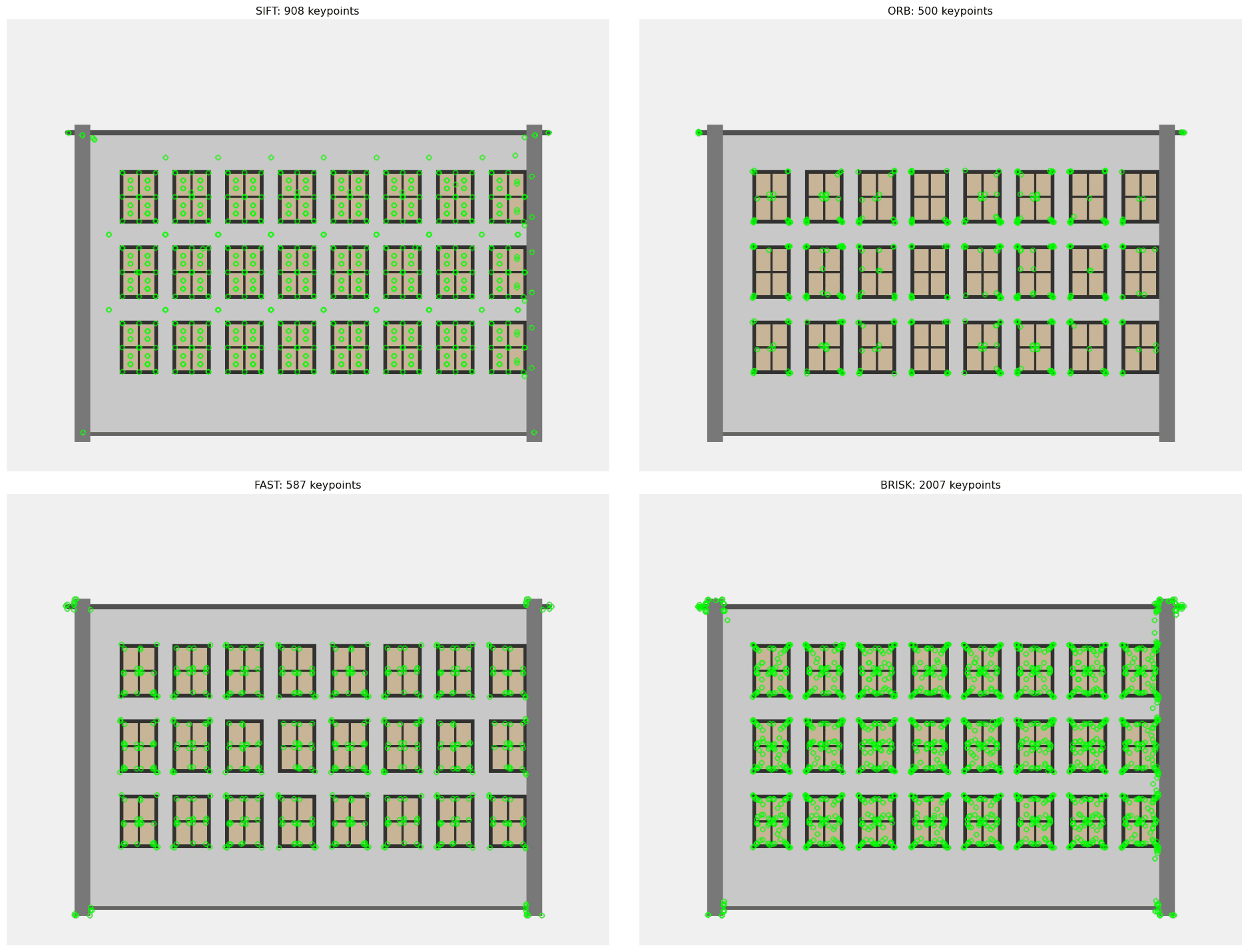
## Feature Detection Comparison
Let's compare different feature detectors to understand their strengths:
```{python}
#| eval: true
def compare_feature_detectors(image):
    """Compare different feature detection algorithms"""
    if len(image.shape) == 3:
        gray = cv2.cvtColor(image, cv2.COLOR_RGB2GRAY)
    else:
        gray = image

    # Different detectors
    detectors = {
        'SIFT': cv2.SIFT_create(),
        'ORB': cv2.ORB_create(),
        'FAST': cv2.FastFeatureDetector_create(),
        'BRISK': cv2.BRISK_create()
    }

    results = {}

    plt.figure(figsize=(20, 15))

    for i, (name, detector) in enumerate(detectors.items()):
        # Detect keypoints
        if name in ['SIFT', 'ORB', 'BRISK']:
            keypoints, descriptors = detector.detectAndCompute(gray, None)
        else:  # FAST doesn't compute descriptors
            keypoints = detector.detect(gray, None)
            descriptors = None

        # Draw keypoints
        img_with_kp = cv2.drawKeypoints(image, keypoints, None, color=(0, 255, 0))

        # Store results
        results[name] = {
            'keypoints': len(keypoints),
            'has_descriptors': descriptors is not None,
            'speed': 'Fast' if name in ['FAST', 'ORB'] else 'Slow'
        }

        # Plot
        plt.subplot(2, 2, i + 1)
        plt.imshow(img_with_kp)
        plt.title(f"{name}: {len(keypoints)} keypoints")
        plt.axis('off')

    plt.tight_layout()
    plt.show()

    # Print comparison table
    print("Feature Detector Comparison:")
    print("-" * 60)
    print(f"{'Detector':<10} | {'Keypoints':<10} | {'Descriptors':<12} | {'Speed':<8}")
    print("-" * 60)
    for name, data in results.items():
        desc_info = "✓" if data['has_descriptors'] else "✗"
        print(f"{name:<10} | {data['keypoints']:<10} | {desc_info:<12} | {data['speed']:<8}")

    return results

# Compare detectors on architectural image
print("Comparing feature detectors on architectural scene:")
comparison_results = compare_feature_detectors(img_rgb)
```
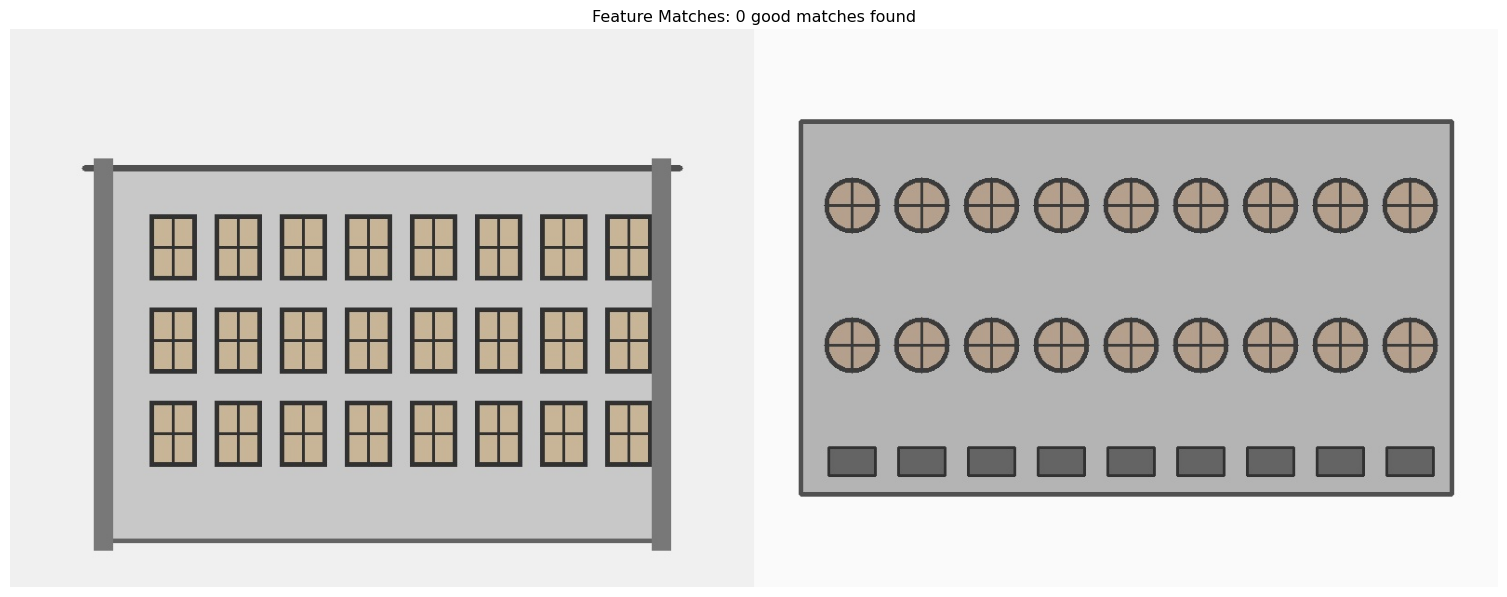
## Your Challenge: Build a Panorama Stitcher
Now it's your turn! Here's a framework for a panorama stitching system:
```{python}
#| eval: true
class PanoramaStitcher:
    def __init__(self):
        self.detector = cv2.SIFT_create()
        self.matcher = cv2.BFMatcher()

    def find_homography(self, img1, img2):
        """Find transformation between two images"""
        # Convert to grayscale
        gray1 = cv2.cvtColor(img1, cv2.COLOR_RGB2GRAY) if len(img1.shape) == 3 else img1
        gray2 = cv2.cvtColor(img2, cv2.COLOR_RGB2GRAY) if len(img2.shape) == 3 else img2

        # Find keypoints and descriptors
        kp1, desc1 = self.detector.detectAndCompute(gray1, None)
        kp2, desc2 = self.detector.detectAndCompute(gray2, None)

        if desc1 is None or desc2 is None:
            return None, None, 0

        # Match features
        matches = self.matcher.knnMatch(desc1, desc2, k=2)

        # Filter good matches using Lowe's ratio test
        good_matches = []
        for match_pair in matches:
            if len(match_pair) == 2:
                m, n = match_pair
                if m.distance < 0.7 * n.distance:
                    good_matches.append(m)

        if len(good_matches) < 10:
            return None, None, len(good_matches)

        # Extract matched points
        src_pts = np.float32([kp1[m.queryIdx].pt for m in good_matches]).reshape(-1, 1, 2)
        dst_pts = np.float32([kp2[m.trainIdx].pt for m in good_matches]).reshape(-1, 1, 2)

        # Find homography using RANSAC
        homography, mask = cv2.findHomography(src_pts, dst_pts, cv2.RANSAC, 5.0)

        return homography, mask, len(good_matches)

    def visualize_matches(self, img1, img2):
        """Visualize feature matches between two images"""
        # Find features
        gray1 = cv2.cvtColor(img1, cv2.COLOR_RGB2GRAY) if len(img1.shape) == 3 else img1
        gray2 = cv2.cvtColor(img2, cv2.COLOR_RGB2GRAY) if len(img2.shape) == 3 else img2

        kp1, desc1 = self.detector.detectAndCompute(gray1, None)
        kp2, desc2 = self.detector.detectAndCompute(gray2, None)

        if desc1 is None or desc2 is None:
            print("Could not find features in one or both images")
            return

        # Match and filter
        matches = self.matcher.knnMatch(desc1, desc2, k=2)
        good_matches = []
        for match_pair in matches:
            if len(match_pair) == 2:
                m, n = match_pair
                if m.distance < 0.7 * n.distance:
                    good_matches.append(m)

        # Draw matches
        matched_img = cv2.drawMatches(
            img1, kp1, img2, kp2, good_matches[:30], None,
            flags=cv2.DrawMatchesFlags_NOT_DRAW_SINGLE_POINTS
        )

        plt.figure(figsize=(20, 10))
        plt.imshow(matched_img)
        plt.title(f"Feature Matches: {len(good_matches)} good matches found")
        plt.axis('off')
        plt.show()

        return len(good_matches)

# Test the panorama stitcher
stitcher = PanoramaStitcher()

print("Analyzing feature matches between architectural images:")
num_matches = stitcher.visualize_matches(img_rgb, img2_rgb)

if num_matches and num_matches > 10:
    print(f"✅ Great! Found {num_matches} matches - perfect for panorama stitching!")
    print("💡 Challenge: Implement the actual image stitching using cv2.warpPerspective")
else:
    print("❌ Not enough matches for reliable stitching")
    print("💡 Try with images that have more overlap or distinctive features")
```
## The Magic Behind Feature Matching
Understanding what makes feature matching work:
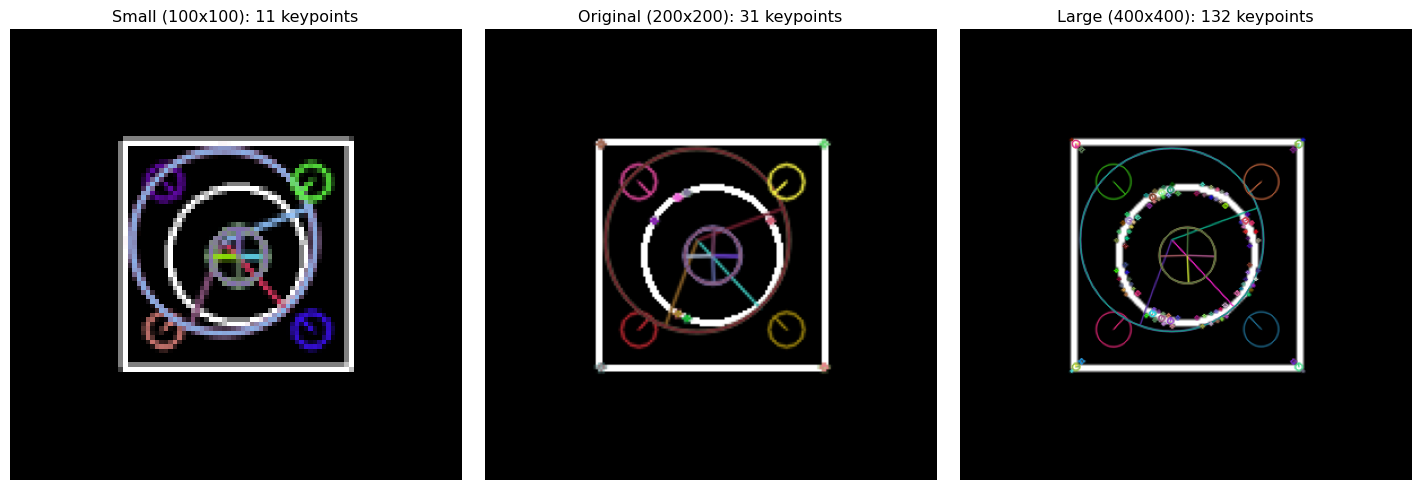
### 1. **Scale Invariance**
Features can be detected at different sizes:
```{python}
#| eval: true
# Demonstrate scale invariance
def show_scale_invariance():
    # Create a simple pattern
    pattern = np.zeros((200, 200), dtype=np.uint8)
    cv2.rectangle(pattern, (50, 50), (150, 150), 255, 2)
    cv2.circle(pattern, (100, 100), 30, 255, 2)

    # Scale it
    small_pattern = cv2.resize(pattern, (100, 100))
    large_pattern = cv2.resize(pattern, (400, 400))

    # Detect features in each
    sift = cv2.SIFT_create()

    kp_orig, _ = sift.detectAndCompute(pattern, None)
    kp_small, _ = sift.detectAndCompute(small_pattern, None)
    kp_large, _ = sift.detectAndCompute(large_pattern, None)

    # Visualize
    plt.figure(figsize=(15, 5))

    plt.subplot(1, 3, 1)
    img_small = cv2.drawKeypoints(cv2.cvtColor(small_pattern, cv2.COLOR_GRAY2RGB),
                                  kp_small, None, flags=cv2.DRAW_MATCHES_FLAGS_DRAW_RICH_KEYPOINTS)
    plt.imshow(img_small)
    plt.title(f"Small (100x100): {len(kp_small)} keypoints")
    plt.axis('off')

    plt.subplot(1, 3, 2)
    img_orig = cv2.drawKeypoints(cv2.cvtColor(pattern, cv2.COLOR_GRAY2RGB),
                                 kp_orig, None, flags=cv2.DRAW_MATCHES_FLAGS_DRAW_RICH_KEYPOINTS)
    plt.imshow(img_orig)
    plt.title(f"Original (200x200): {len(kp_orig)} keypoints")
    plt.axis('off')

    plt.subplot(1, 3, 3)
    img_large = cv2.drawKeypoints(cv2.cvtColor(large_pattern, cv2.COLOR_GRAY2RGB),
                                  kp_large, None, flags=cv2.DRAW_MATCHES_FLAGS_DRAW_RICH_KEYPOINTS)
    plt.imshow(img_large)
    plt.title(f"Large (400x400): {len(kp_large)} keypoints")
    plt.axis('off')

    plt.tight_layout()
    plt.show()

    print("✨ Scale Invariance: SIFT detects similar features at different scales!")

show_scale_invariance()
```
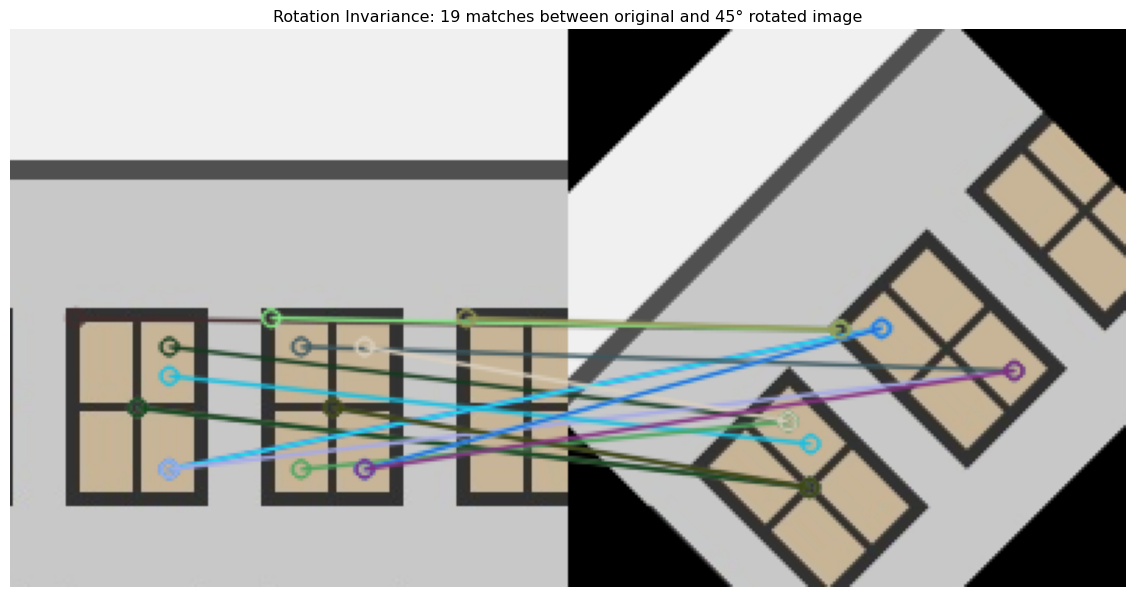
### 2. **Rotation Invariance**
Features remain detectable when rotated:
```{python}
#| eval: true
# Demonstrate rotation invariance
def show_rotation_invariance():
    # Use a small crop with clear features
    if 'img_rgb' in globals():
        test_img = img_rgb[100:300, 200:400]
    else:
        # Create a test pattern if main image not available
        test_img = np.zeros((200, 200, 3), dtype=np.uint8)
        cv2.rectangle(test_img, (50, 50), (150, 150), (255, 255, 255), 2)
        cv2.circle(test_img, (100, 100), 30, (255, 255, 255), 2)

    # Rotate the image
    center = (test_img.shape[1]//2, test_img.shape[0]//2)
    rotation_matrix = cv2.getRotationMatrix2D(center, 45, 1.0)
    rotated_img = cv2.warpAffine(test_img, rotation_matrix, (test_img.shape[1], test_img.shape[0]))

    # Detect features
    sift = cv2.SIFT_create()

    gray_orig = cv2.cvtColor(test_img, cv2.COLOR_RGB2GRAY)
    gray_rot = cv2.cvtColor(rotated_img, cv2.COLOR_RGB2GRAY)

    kp_orig, desc_orig = sift.detectAndCompute(gray_orig, None)
    kp_rot, desc_rot = sift.detectAndCompute(gray_rot, None)

    # Match features
    if desc_orig is not None and desc_rot is not None:
        bf = cv2.BFMatcher()
        matches = bf.knnMatch(desc_orig, desc_rot, k=2)
        good_matches = []
        for match_pair in matches:
            if len(match_pair) == 2:
                m, n = match_pair
                if m.distance < 0.7 * n.distance:
                    good_matches.append(m)

        # Visualize
        matched_img = cv2.drawMatches(
            test_img, kp_orig, rotated_img, kp_rot, good_matches, None,
            flags=cv2.DrawMatchesFlags_NOT_DRAW_SINGLE_POINTS
        )

        plt.figure(figsize=(15, 8))
        plt.imshow(matched_img)
        plt.title(f"Rotation Invariance: {len(good_matches)} matches between original and 45° rotated image")
        plt.axis('off')
        plt.show()

        print(f"🔄 Rotation Invariance: Found {len(good_matches)} matching features despite 45° rotation!")
    else:
        print("Could not detect enough features for matching")

show_rotation_invariance()
```
## Key Takeaways
- **Features are the "fingerprints"** of images - unique, repeatable points
- **SIFT is more accurate** but slower; **ORB is faster** but less precise
- **Feature matching** enables object recognition, panorama stitching, and 3D reconstruction
- **Lowe's ratio test** filters out ambiguous matches for better accuracy
- **Scale and rotation invariance** make features robust to transformations
- **Real-world applications** include Google Photos, autonomous vehicles, and AR/VR
## What's Coming Next?
In our next post, [**"Why Deep Learning? When Classical Methods Hit the Wall"**](07-why-deep-learning.qmd), we'll discover:
- **The limitations** of classical computer vision methods
- **Why neural networks** revolutionized image understanding
- **Your first deep learning model** for image classification
- **Transfer learning** - standing on the shoulders of giants
You've mastered the art of finding and matching features—next, we'll explore how deep learning took computer vision to the next level!
:::{.callout-tip}
## Hands-On Lab
Ready to extract and match features in your own images? Try the complete interactive notebook: [**Feature Magic Lab**](https://colab.research.google.com/github/hasanpasha/quarto_blog_hasan/blob/main/notebooks/cv-foundations-05-feature-magic.ipynb)
Build panoramas, recognize objects, and explore the magic of feature detection!
:::
:::{.callout-note}
## Series Navigation
- **Previous**: [Image Segmentation: Dividing and Conquering](05-image-segmentation.qmd)
- **Next**: [Why Deep Learning? When Classical Methods Hit the Wall](07-why-deep-learning.qmd)
- **Series Home**: [Computer Vision Foundations](../computer-vision-foundations.qmd)
:::
---
*You've just learned one of the most powerful techniques in computer vision! Feature matching is used in everything from Google Photos to archaeological site reconstruction. Next, we'll see why deep learning became necessary and how it builds on these foundations.*