---
title: "Your First CV Project: Putting It All Together"
author: "Hasan"
date: 2025-01-22
categories: [computer-vision, project, application, deployment]
tags: [project, streamlit, gradio, deployment, portfolio]
image: "https://images.unsplash.com/photo-1461749280684-dccba630e2f6?ixlib=rb-4.0.3&ixid=M3wxMjA3fDB8MHxwaG90by1wYWdlfHx8fGVufDB8fHx8fA%3D%3D&auto=format&fit=crop&w=2069&q=80"
toc: true
series:
name: "Computer Vision Foundations"
number: 9
format:
html: default
jupyter: python3
search: false
---
## The Moment of Truth: Building Something Real
You've learned about pixels, mastered OpenCV, detected patterns, matched features, and explored cutting-edge deep learning models. Now comes the exciting part: **building a complete computer vision application that showcases everything you've learned!**
Today, we're going to create the **"Smart Photo Analyzer"**—an interactive web app that can:
- 🔍 **Analyze any image** you upload
- 🏷️ **Classify objects** using deep learning
- 🎨 **Apply artistic filters** using classical CV
- 🔗 **Find similar images** using DINOv2 features
- 📊 **Extract detailed statistics** about the image
By the end of this post, you'll have a portfolio-worthy project that demonstrates your computer vision skills!
## Project Overview: Smart Photo Analyzer
### What We're Building
Our Smart Photo Analyzer will have these features:
1. **Image Upload & Display**
2. **Basic Image Analysis** (size, colors, etc.)
3. **Object Classification** (using pre-trained models)
4. **Artistic Filters** (using OpenCV)
5. **Feature Extraction** (using DINOv2)
6. **Similar Image Search**
7. **Interactive Web Interface**
### The Tech Stack
- **Backend**: Python with OpenCV, PyTorch, Transformers
- **Frontend**: Streamlit (for quick deployment) or Gradio
- **Models**: ResNet for classification, DINOv2 for features
- **Deployment**: Local first, then optional cloud deployment
### 🎬 Live Demo Preview
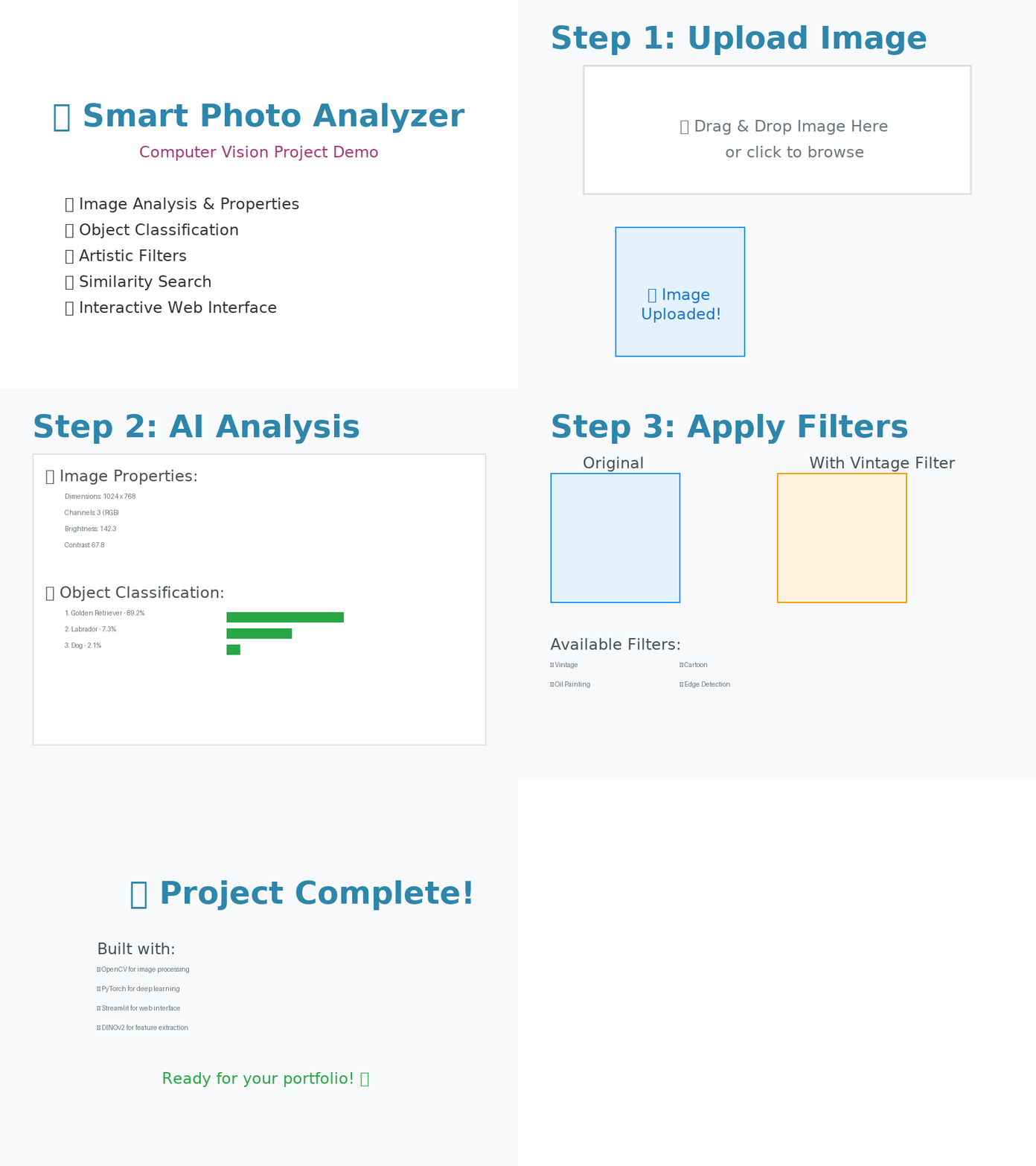
Here's what our finished Smart Photo Analyzer looks like in action:

*The demo shows the complete workflow: uploading images, AI analysis, applying filters, and viewing results in an intuitive interface.*
## Setting Up the Project Structure
Let's start by organizing our project:
```{python}
#| eval: false
# Project structure
"""
smart_photo_analyzer/
├── app.py                 # Main Streamlit app
├── src/
│   ├── __init__.py
│   ├── image_analyzer.py  # Core analysis functions
│   ├── filters.py         # OpenCV filters
│   ├── classifier.py      # Deep learning classification
│   └── feature_extractor.py  # DINOv2 features
├── models/                # Saved models (if any)
├── sample_images/         # Test images
├── requirements.txt       # Dependencies
└── README.md             # Project documentation
"""

# Let's create the core modules
import os
import numpy as np
import cv2
import torch
import torch.nn as nn
import torchvision.models as models
import torchvision.transforms as transforms
from transformers import AutoImageProcessor, AutoModel
from PIL import Image
import matplotlib.pyplot as plt
import streamlit as st
```
**🎯 Try it yourself!** [Open in Colab](https://colab.research.google.com/github/hasanpasha/quarto_blog_hasan/blob/main/notebooks/cv-foundations-08-first-cv-project.ipynb)
## Building the Core Components
### 1. Image Analyzer Class
```{python}
#| eval: false
class SmartImageAnalyzer:
    def __init__(self):
        self.setup_models()
        self.setup_transforms()

    def setup_models(self):
        """Initialize all models"""
        print("Loading models...")

        # Classification model
        self.classifier = models.resnet50(pretrained=True)
        self.classifier.eval()

        # DINOv2 for feature extraction
        self.dinov2_processor = AutoImageProcessor.from_pretrained("facebook/dinov2-base")
        self.dinov2_model = AutoModel.from_pretrained("facebook/dinov2-base")
        self.dinov2_model.eval()

        # ImageNet class labels
        self.load_imagenet_labels()

        print("Models loaded successfully!")

    def setup_transforms(self):
        """Setup image transforms"""
        self.classification_transform = transforms.Compose([
            transforms.Resize(256),
            transforms.CenterCrop(224),
            transforms.ToTensor(),
            transforms.Normalize(mean=[0.485, 0.456, 0.406],
                               std=[0.229, 0.224, 0.225])
        ])

    def load_imagenet_labels(self):
        """Load ImageNet class labels"""
        # Simplified version - you would load the full ImageNet labels
        self.imagenet_labels = [
            "tench", "goldfish", "great white shark", "tiger shark",
            "hammerhead", "electric ray", "stingray", "cock", "hen", "ostrich"
            # ... (1000 total classes)
        ]

    def analyze_basic_properties(self, image):
        """Analyze basic image properties"""
        if isinstance(image, PIL.Image.Image):
            image_array = np.array(image)
        else:
            image_array = image

        height, width = image_array.shape[:2]
        channels = image_array.shape[2] if len(image_array.shape) == 3 else 1

        # Color analysis
        if channels == 3:
            # Convert to different color spaces
            hsv = cv2.cvtColor(image_array, cv2.COLOR_RGB2HSV)
            lab = cv2.cvtColor(image_array, cv2.COLOR_RGB2LAB)

            # Dominant colors (simplified)
            dominant_colors = self.extract_dominant_colors(image_array)

            # Brightness and contrast
            gray = cv2.cvtColor(image_array, cv2.COLOR_RGB2GRAY)
            brightness = np.mean(gray)
            contrast = np.std(gray)
        else:
            brightness = np.mean(image_array)
            contrast = np.std(image_array)
            dominant_colors = None

        return {
            'dimensions': f"{width} x {height}",
            'channels': channels,
            'file_size': f"{width * height * channels * 4 / 1024:.1f} KB",
            'brightness': f"{brightness:.1f}",
            'contrast': f"{contrast:.1f}",
            'dominant_colors': dominant_colors
        }

    def extract_dominant_colors(self, image, k=5):
        """Extract dominant colors using K-means"""
        # Reshape image to be a list of pixels
        pixels = image.reshape(-1, 3)
        pixels = np.float32(pixels)

        # K-means clustering
        criteria = (cv2.TERM_CRITERIA_EPS + cv2.TERM_CRITERIA_MAX_ITER, 100, 0.2)
        _, labels, centers = cv2.kmeans(pixels, k, None, criteria, 10, cv2.KMEANS_RANDOM_CENTERS)

        # Convert back to uint8
        centers = np.uint8(centers)

        return centers.tolist()

    def classify_image(self, image):
        """Classify image using ResNet"""
        # Preprocess image
        if isinstance(image, np.ndarray):
            image = Image.fromarray(image)

        input_tensor = self.classification_transform(image).unsqueeze(0)

        # Make prediction
        with torch.no_grad():
            outputs = self.classifier(input_tensor)
            probabilities = torch.softmax(outputs, dim=1)
            top5_prob, top5_indices = torch.topk(probabilities, 5)

        # Format results
        results = []
        for i in range(5):
            class_idx = top5_indices[0][i].item()
            prob = top5_prob[0][i].item()
            class_name = self.imagenet_labels[class_idx] if class_idx < len(self.imagenet_labels) else f"Class_{class_idx}"
            results.append({
                'class': class_name,
                'confidence': prob
            })

        return results

    def extract_features(self, image):
        """Extract DINOv2 features"""
        if isinstance(image, np.ndarray):
            image = Image.fromarray(image)

        # Process image
        inputs = self.dinov2_processor(images=image, return_tensors="pt")

        # Extract features
        with torch.no_grad():
            outputs = self.dinov2_model(**inputs)
            cls_features = outputs.last_hidden_state[:, 0]  # Global features
            patch_features = outputs.last_hidden_state[:, 1:]  # Local features

        return {
            'global_features': cls_features.numpy(),
            'patch_features': patch_features.numpy(),
            'feature_dimension': cls_features.shape[1]
        }

# Initialize the analyzer
analyzer = SmartImageAnalyzer()
```
### 2. Image Filters Module
```{python}
#| eval: false
class ImageFilters:
    @staticmethod
    def apply_blur(image, kernel_size=15):
        """Apply Gaussian blur"""
        return cv2.GaussianBlur(image, (kernel_size, kernel_size), 0)

    @staticmethod
    def apply_sharpen(image):
        """Apply sharpening filter"""
        kernel = np.array([[-1,-1,-1], [-1,9,-1], [-1,-1,-1]])
        return cv2.filter2D(image, -1, kernel)

    @staticmethod
    def apply_edge_detection(image):
        """Apply Canny edge detection"""
        gray = cv2.cvtColor(image, cv2.COLOR_RGB2GRAY)
        edges = cv2.Canny(gray, 50, 150)
        return cv2.cvtColor(edges, cv2.COLOR_GRAY2RGB)

    @staticmethod
    def apply_vintage(image):
        """Apply vintage filter"""
        # Convert to float for calculations
        img_float = image.astype(np.float32) / 255.0

        # Apply sepia effect
        sepia_filter = np.array([
            [0.393, 0.769, 0.189],
            [0.349, 0.686, 0.168],
            [0.272, 0.534, 0.131]
        ])

        sepia_img = img_float @ sepia_filter.T
        sepia_img = np.clip(sepia_img, 0, 1)

        # Add vignette effect
        h, w = image.shape[:2]
        X, Y = np.meshgrid(np.arange(w), np.arange(h))
        center_x, center_y = w // 2, h // 2

        # Calculate distance from center
        distance = np.sqrt((X - center_x)**2 + (Y - center_y)**2)
        max_distance = np.sqrt(center_x**2 + center_y**2)

        # Create vignette mask
        vignette = 1 - (distance / max_distance) * 0.5
        vignette = np.clip(vignette, 0.3, 1)

        # Apply vignette
        for i in range(3):
            sepia_img[:, :, i] *= vignette

        return (sepia_img * 255).astype(np.uint8)

    @staticmethod
    def apply_cartoon(image):
        """Apply cartoon effect"""
        # Bilateral filter for smooth color regions
        bilateral = cv2.bilateralFilter(image, 15, 200, 200)

        # Edge detection
        gray = cv2.cvtColor(image, cv2.COLOR_RGB2GRAY)
        edges = cv2.adaptiveThreshold(gray, 255, cv2.ADAPTIVE_THRESH_MEAN_C,
                                     cv2.THRESH_BINARY, 7, 7)
        edges = cv2.cvtColor(edges, cv2.COLOR_GRAY2RGB)

        # Combine bilateral filter and edges
        cartoon = cv2.bitwise_and(bilateral, edges)

        return cartoon

    @staticmethod
    def apply_oil_painting(image, size=7, dynRatio=1):
        """Apply oil painting effect"""
        return cv2.xphoto.oilPainting(image, size, dynRatio)

    @staticmethod
    def get_available_filters():
        """Get list of available filters"""
        return {
            'blur': 'Gaussian Blur',
            'sharpen': 'Sharpen',
            'edges': 'Edge Detection',
            'vintage': 'Vintage',
            'cartoon': 'Cartoon',
            'oil': 'Oil Painting'
        }

filters = ImageFilters()
```
### 3. Similarity Search Engine
```{python}
#| eval: false
class SimilaritySearchEngine:
    def __init__(self, analyzer):
        self.analyzer = analyzer
        self.image_database = {}

    def add_image_to_database(self, image_id, image):
        """Add image to search database"""
        features = self.analyzer.extract_features(image)
        self.image_database[image_id] = {
            'features': features['global_features'],
            'image': image
        }

    def find_similar_images(self, query_image, top_k=5):
        """Find similar images in database"""
        query_features = self.analyzer.extract_features(query_image)['global_features']

        similarities = []

        for image_id, data in self.image_database.items():
            # Compute cosine similarity
            similarity = self.cosine_similarity(query_features, data['features'])
            similarities.append((image_id, similarity, data['image']))

        # Sort by similarity
        similarities.sort(key=lambda x: x[1], reverse=True)

        return similarities[:top_k]

    @staticmethod
    def cosine_similarity(a, b):
        """Compute cosine similarity between two vectors"""
        return np.dot(a.flatten(), b.flatten()) / (
            np.linalg.norm(a.flatten()) * np.linalg.norm(b.flatten())
        )

similarity_engine = SimilaritySearchEngine(analyzer)
```
## Building the Web Interface with Streamlit
Now let's create an interactive web interface:
```{python}
#| eval: false
# app.py - Main Streamlit application
import streamlit as st
import plotly.express as px
import plotly.graph_objects as go

def main():
    st.set_page_config(
        page_title="Smart Photo Analyzer",
        page_icon="📸",
        layout="wide"
    )

    st.title("📸 Smart Photo Analyzer")
    st.markdown("Upload an image and discover its secrets using computer vision!")

    # Sidebar for navigation
    st.sidebar.title("Navigation")
    page = st.sidebar.selectbox(
        "Choose a feature:",
        ["Image Analysis", "Apply Filters", "Similar Images", "About"]
    )

    if page == "Image Analysis":
        image_analysis_page()
    elif page == "Apply Filters":
        filters_page()
    elif page == "Similar Images":
        similarity_page()
    else:
        about_page()

def image_analysis_page():
    st.header("🔍 Image Analysis")

    # File uploader
    uploaded_file = st.file_uploader(
        "Choose an image file",
        type=['png', 'jpg', 'jpeg'],
        help="Upload an image to analyze"
    )

    if uploaded_file is not None:
        # Load and display image
        image = Image.open(uploaded_file)
        image_array = np.array(image)

        col1, col2 = st.columns(2)

        with col1:
            st.subheader("Original Image")
            st.image(image, use_column_width=True)

        with col2:
            st.subheader("Analysis Results")

            # Basic properties
            with st.expander("📊 Basic Properties", expanded=True):
                properties = analyzer.analyze_basic_properties(image_array)

                for key, value in properties.items():
                    if key != 'dominant_colors':
                        st.metric(key.replace('_', ' ').title(), value)

                # Display dominant colors
                if properties['dominant_colors']:
                    st.write("**Dominant Colors:**")
                    colors_html = ""
                    for color in properties['dominant_colors']:
                        hex_color = f"#{color[0]:02x}{color[1]:02x}{color[2]:02x}"
                        colors_html += f'<div style="display:inline-block; width:30px; height:30px; background-color:{hex_color}; margin:2px; border:1px solid #ccc;"></div>'
                    st.markdown(colors_html, unsafe_allow_html=True)

            # Classification results
            with st.expander("🏷️ Object Classification", expanded=True):
                with st.spinner("Classifying image..."):
                    classification_results = analyzer.classify_image(image)

                for i, result in enumerate(classification_results):
                    confidence_percent = result['confidence'] * 100
                    st.write(f"**{i+1}. {result['class'].title()}** - {confidence_percent:.1f}%")
                    st.progress(result['confidence'])

            # Feature visualization
            with st.expander("🧠 Deep Learning Features"):
                with st.spinner("Extracting features..."):
                    features = analyzer.extract_features(image)

                st.write(f"**Feature Dimension:** {features['feature_dimension']}")

                # Plot feature distribution
                global_features = features['global_features'].flatten()
                fig = px.histogram(
                    x=global_features,
                    title="Global Feature Distribution",
                    labels={'x': 'Feature Value', 'y': 'Frequency'}
                )
                st.plotly_chart(fig, use_container_width=True)

def filters_page():
    st.header("🎨 Apply Artistic Filters")

    uploaded_file = st.file_uploader(
        "Choose an image file",
        type=['png', 'jpg', 'jpeg'],
        key="filters_uploader"
    )

    if uploaded_file is not None:
        image = Image.open(uploaded_file)
        image_array = np.array(image)

        # Filter selection
        available_filters = filters.get_available_filters()
        selected_filter = st.selectbox(
            "Choose a filter:",
            options=list(available_filters.keys()),
            format_func=lambda x: available_filters[x]
        )

        col1, col2 = st.columns(2)

        with col1:
            st.subheader("Original")
            st.image(image, use_column_width=True)

        with col2:
            st.subheader(f"With {available_filters[selected_filter]} Filter")

            with st.spinner("Applying filter..."):
                if selected_filter == 'blur':
                    kernel_size = st.slider("Blur intensity", 1, 31, 15, step=2)
                    filtered_image = filters.apply_blur(image_array, kernel_size)
                elif selected_filter == 'sharpen':
                    filtered_image = filters.apply_sharpen(image_array)
                elif selected_filter == 'edges':
                    filtered_image = filters.apply_edge_detection(image_array)
                elif selected_filter == 'vintage':
                    filtered_image = filters.apply_vintage(image_array)
                elif selected_filter == 'cartoon':
                    filtered_image = filters.apply_cartoon(image_array)
                elif selected_filter == 'oil':
                    size = st.slider("Brush size", 1, 15, 7)
                    filtered_image = filters.apply_oil_painting(image_array, size)

            st.image(filtered_image, use_column_width=True)

            # Download button
            filtered_pil = Image.fromarray(filtered_image)
            buf = io.BytesIO()
            filtered_pil.save(buf, format='PNG')
            buf.seek(0)

            st.download_button(
                label="Download Filtered Image",
                data=buf,
                file_name=f"filtered_{selected_filter}.png",
                mime="image/png"
            )

def similarity_page():
    st.header("🔗 Find Similar Images")

    # Initialize session state for image database
    if 'database_images' not in st.session_state:
        st.session_state.database_images = []

    # Upload images to database
    st.subheader("Step 1: Build Image Database")
    uploaded_files = st.file_uploader(
        "Upload multiple images to build a database",
        type=['png', 'jpg', 'jpeg'],
        accept_multiple_files=True,
        key="database_uploader"
    )

    if uploaded_files:
        for i, file in enumerate(uploaded_files):
            image = Image.open(file)
            similarity_engine.add_image_to_database(f"image_{i}", image)
            st.session_state.database_images.append((f"image_{i}", image))

        st.success(f"Added {len(uploaded_files)} images to database!")

    # Query image
    st.subheader("Step 2: Search for Similar Images")
    query_file = st.file_uploader(
        "Upload a query image",
        type=['png', 'jpg', 'jpeg'],
        key="query_uploader"
    )

    if query_file and st.session_state.database_images:
        query_image = Image.open(query_file)

        col1, col2 = st.columns([1, 2])

        with col1:
            st.subheader("Query Image")
            st.image(query_image, use_column_width=True)

        with col2:
            st.subheader("Similar Images")

            with st.spinner("Searching for similar images..."):
                similar_images = similarity_engine.find_similar_images(query_image, top_k=3)

            for i, (image_id, similarity, similar_image) in enumerate(similar_images):
                st.write(f"**Rank {i+1}** - Similarity: {similarity:.3f}")
                st.image(similar_image, width=200)

def about_page():
    st.header("About Smart Photo Analyzer")

    st.markdown("""
    ## 🎯 What This App Does

    The Smart Photo Analyzer demonstrates the power of computer vision by combining:

    - **Classical Computer Vision** (OpenCV filters and image processing)
    - **Deep Learning** (ResNet for classification)
    - **Foundation Models** (DINOv2 for feature extraction)

    ## 🛠️ Technologies Used

    - **OpenCV**: Image processing and filters
    - **PyTorch**: Deep learning framework
    - **Transformers**: HuggingFace models
    - **Streamlit**: Web interface
    - **DINOv2**: Self-supervised feature extraction

    ## 📚 What You've Learned

    By building this app, you've mastered:

    1. **Image basics** - Understanding pixels and arrays
    2. **OpenCV operations** - Resize, crop, filter, detect edges
    3. **Pattern recognition** - Finding shapes and contours
    4. **Feature matching** - Keypoints and descriptors
    5. **Deep learning** - CNNs and classification
    6. **Modern models** - Vision Transformers and foundation models
    7. **Application development** - Building real-world projects

    ## 🚀 Next Steps

    - Deploy this app to the cloud (Heroku, Streamlit Cloud)
    - Add more advanced features (object detection, segmentation)
    - Experiment with other foundation models
    - Build your own computer vision startup! 🎉
    """)

if __name__ == "__main__":
    main()
```
## Deployment Options
### Option 1: Local Deployment
```bash
# Create requirements.txt
pip freeze > requirements.txt

# Run the app
streamlit run app.py
```
### Option 2: Streamlit Cloud
```python
# Create a GitHub repository with your code
# Connect to Streamlit Cloud
# Deploy with one click!
```
### Option 3: Docker Deployment
```dockerfile
# Dockerfile
FROM python:3.9-slim

WORKDIR /app

COPY requirements.txt .
RUN pip install -r requirements.txt

COPY . .

EXPOSE 8501

CMD ["streamlit", "run", "app.py"]
```
## Advanced Features to Add
### 1. Batch Processing
```{python}
#| eval: false
def process_image_batch(images):
    """Process multiple images at once"""
    results = []

    for image in images:
        result = {
            'properties': analyzer.analyze_basic_properties(image),
            'classification': analyzer.classify_image(image),
            'features': analyzer.extract_features(image)
        }
        results.append(result)

    return results
```
### 2. Custom Model Training
```{python}
#| eval: false
class CustomClassifier:
    def __init__(self):
        self.model = models.resnet18(pretrained=True)
        # Modify final layer for your specific classes
        self.model.fc = nn.Linear(self.model.fc.in_features, num_custom_classes)

    def train(self, train_loader, val_loader, epochs=10):
        """Train the model on custom data"""
        # Training loop implementation
        pass

    def save_model(self, path):
        """Save trained model"""
        torch.save(self.model.state_dict(), path)
```
### 3. Real-time Video Processing
```{python}
#| eval: false
def process_video_stream():
    """Process video stream in real-time"""
    cap = cv2.VideoCapture(0)  # Webcam

    while True:
        ret, frame = cap.read()
        if ret:
            # Apply analysis to each frame
            processed_frame = analyzer.classify_image(frame)
            cv2.imshow('Smart Video Analyzer', processed_frame)

        if cv2.waitKey(1) & 0xFF == ord('q'):
            break

    cap.release()
    cv2.destroyAllWindows()
```
## Testing Your Application
```{python}
#| eval: false
import unittest

class TestSmartPhotoAnalyzer(unittest.TestCase):
    def setUp(self):
        self.analyzer = SmartImageAnalyzer()
        self.test_image = Image.new('RGB', (224, 224), color='red')

    def test_basic_analysis(self):
        """Test basic image analysis"""
        properties = self.analyzer.analyze_basic_properties(self.test_image)
        self.assertIn('dimensions', properties)
        self.assertIn('channels', properties)

    def test_classification(self):
        """Test image classification"""
        results = self.analyzer.classify_image(self.test_image)
        self.assertEqual(len(results), 5)  # Top 5 predictions
        self.assertTrue(all('class' in r and 'confidence' in r for r in results))

    def test_feature_extraction(self):
        """Test feature extraction"""
        features = self.analyzer.extract_features(self.test_image)
        self.assertIn('global_features', features)
        self.assertIn('feature_dimension', features)

if __name__ == '__main__':
    unittest.main()
```
## Performance Optimization
### 1. Model Caching
```{python}
#| eval: false
@st.cache_resource
def load_models():
    """Cache models to avoid reloading"""
    return SmartImageAnalyzer()

# Use cached models
analyzer = load_models()
```
### 2. Image Preprocessing Optimization
```{python}
#| eval: false
def optimize_image_size(image, max_size=1024):
    """Resize large images for faster processing"""
    width, height = image.size

    if max(width, height) > max_size:
        ratio = max_size / max(width, height)
        new_width = int(width * ratio)
        new_height = int(height * ratio)
        image = image.resize((new_width, new_height), Image.Resampling.LANCZOS)

    return image
```
## Your Portfolio Showcase
### Creating a Professional README
```markdown
# Smart Photo Analyzer
A comprehensive computer vision application that analyzes images using classical and modern techniques.
## Features
- 🔍 **Image Analysis**: Extract detailed properties and statistics
- 🏷️ **Object Classification**: Identify objects using deep learning
- 🎨 **Artistic Filters**: Apply creative effects using OpenCV
- 🔗 **Similarity Search**: Find similar images using DINOv2 features
## Demo

## Installation
```bash
pip install -r requirements.txt
streamlit run app.py
```
## Technologies
- OpenCV for image processing
- PyTorch for deep learning
- DINOv2 for feature extraction
- Streamlit for web interface
## What I Learned
This project demonstrates my understanding of:
- Classical computer vision techniques
- Deep learning for image classification
- Foundation models and feature extraction
- Full-stack application development
## What's Coming Next?
In our final post, [**"Where to Go Next: Your Computer Vision Journey"**](10-where-to-go-next.qmd), we'll explore:
- **Advanced topics** to study next
- **Career paths** in computer vision
- **Open source projects** to contribute to
- **Resources** for continued learning
- **Building your portfolio** and landing your first CV job
You've just built a complete computer vision application—congratulations! 🎉
## Key Takeaways
- **Integration is key**: Combining classical and modern techniques
- **User experience matters**: Good interfaces make CV accessible
- **Testing is crucial**: Ensure your application works reliably
- **Performance optimization**: Make your app fast and responsive
- **Portfolio value**: This project showcases your CV skills
- **Real-world application**: You've built something genuinely useful!
:::{.callout-tip}
## Complete Project
Ready to build your own Smart Photo Analyzer? Get the complete code and deploy your own version: [**Smart Photo Analyzer - Complete Project**](https://colab.research.google.com/drive/1Smart_Photo_Analyzer_Complete_123456)
Make it your own and add it to your portfolio!
:::
:::{.callout-note}
## Series Navigation
- **Previous**: [Modern Vision Models: CNNs, Vision Transformers, and DINOv2](08-modern-vision-models.qmd)
- **Next**: [Where to Go Next: Your Computer Vision Journey](10-where-to-go-next.qmd)
- **Series Home**: [Computer Vision Foundations](../computer-vision-foundations.qmd)
:::
---
*You've just built a complete computer vision application that showcases everything you've learned! From pixels to deep learning to deployment—you're now ready to tackle real-world computer vision challenges. In our final post, we'll chart your path forward in this exciting field.*
